How to Share Shopify Reports Without Giving Store Access

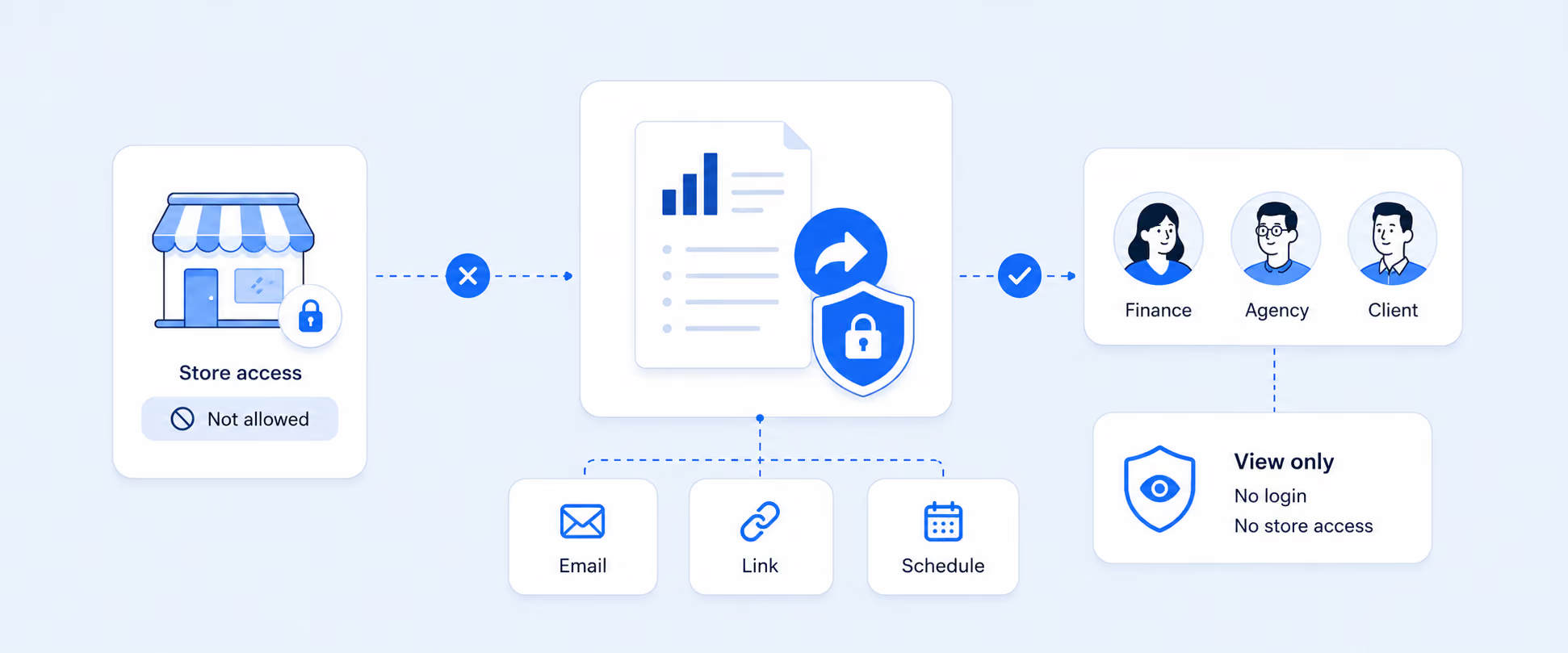
How to Share Shopify Reports With Stakeholders Without Giving Store Access
The moment a Shopify store grows, report sharing turns into a permissions problem.
Finance wants payout and sales numbers. Inventory teams want stock reports. Agencies want campaign performance. Vendors want product movement. Investors want dashboards. The easy answer is to add staff access, but that usually gives people more visibility than they actually need. In Shopify, staff with the Analytics permission can access reports and dashboards, and Shopify does not let you choose access report by report. Staff with analytics access can also access custom reports created or modified in the store.
That is why many merchants start asking a more practical question: how do you share the right Shopify data with the right people without giving them the keys to the admin?
The real problem is not report sharing. It is over-sharing.
Shopify’s native reporting lives inside the admin, so native access usually starts with user permissions.
That works well for people who truly need to work inside the store. But it is less ideal for outside stakeholders, or even internal stakeholders who only need read-only visibility into a few metrics. Once someone has analytics access, Shopify does not provide native controls to limit them to only certain reports. And for custom reports, staff with analytics permissions can access, duplicate, and modify them too.
So the challenge is not “Can Shopify show the report?”
The challenge is “Can I share this data safely without widening admin access more than necessary?”
What Shopify can do natively
Shopify can absolutely support report access inside the admin.
Staff members need Analytics permissions to access reports and dashboards. Those permissions cover Shopify Analytics dashboards and reports, including store performance data, sales information, and other business metrics. Shopify’s analytics pages are available across Shopify subscription plans, but access still depends on permissions.
That means Shopify’s native model is good for:
- Owners
- Finance managers
- Operations staff
- Trusted internal team members
- Anyone who truly needs to work inside the admin
It is not as good for:
- Vendors
- Investors
- Agencies
- External accountants
- B2B customers
- Partners who need visibility but not admin access
Why CSV exports stop working once reporting becomes routine
The default workaround is simple: Export the report and send the file.
For one-time reporting, that is fine. Shopify supports printing and exporting reports from the Reports area.
But CSV sharing starts to break down when:
- The same report needs to go out every week
- Multiple stakeholders need different versions
- The data changes after the export is sent
- People start working from different file versions
- Someone forwards a sensitive file too widely
- Teams want a live view, not a snapshot
That is when reporting shifts from “exporting data” to “managing data distribution.”
The two safe ways to think about Shopify report sharing
Most merchants really have only two clean options.
Option 1: Give admin access to people who truly need it
This is the right option for internal staff who actively work in Shopify and need access to live data inside the admin.
If someone needs to build reports, investigate orders, manage products, or work inside store operations, native Shopify roles and permissions are the right system to use. Shopify’s permissions model is built for that.
Option 2: Share reports outside the admin
This is the better option when stakeholders only need to see the data, not operate the store.
That usually means using:
- Scheduled reports
- Shared dashboards
- Read-only report links
- Spreadsheet destinations such as Google Sheets
- Email delivery
- Slack delivery
- External BI or reporting destinations
This approach keeps store access tighter while still giving people the information they need.
Who should get native Shopify access, and who should not
A simple rule helps here.
Give native Shopify access to people who need to work inside the store.
Do not give native Shopify access to people who only need to consume the output.
That usually means:
- Finance staff who reconcile payouts may need native access
- A marketing agency usually does not
- Internal ops managers may need native access
- Vendors usually do not
- External accountants may only need recurring exports or shared reports
- Investors almost never need admin access
This is the part many teams get wrong. They solve reporting speed by expanding permissions, when the safer answer is often better report delivery.
Why Shopify permissions are not enough for external stakeholders
Shopify’s permissions are role-based, not stakeholder-sharing-based.
That means Shopify is good at deciding which users can do which things inside the admin, but it is not designed as a polished external report-sharing layer. Once a stakeholder does not need operational access, the admin becomes the wrong place to share from.
There are also native permission limits that matter:
- Shopify does not let you choose access to only certain reports
- Analytics permissions open broad reporting access
- Custom reports are accessible to staff with analytics permissions
- Native controls focus on admin users, not external read-only stakeholders
That is why merchants often keep Shopify user management for internal staff and use a separate reporting workflow for everyone else.
What better report sharing looks like in practice
The best report-sharing setup usually has three qualities:
1) The stakeholder sees only what they need
A vendor should not see customer data.
An agency should not see full payouts.
An investor does not need order-edit permissions.
2) The report stays current
If the report is meant to be checked regularly, it should update without someone manually exporting it every time.
3) The merchant controls access without changing core store permissions
The best sharing setup lets you add, revoke, rotate, or separate access without constantly editing Shopify staff roles.
This is the difference between “sending data” and building a secure reporting process.
Common use cases where merchants should avoid store access
There are a few scenarios where shared reporting is almost always better than native store access.
Vendors and suppliers
They may need sales by SKU, inventory by location, or reorder-related reports, but not the store admin.
External accountants or bookkeepers
They may need payout summaries, refunds, taxes, and finance exports, but not product editing or customer-management access.
Agencies and consultants
They often need campaign or channel results, but not broad operational visibility.
Investors or board stakeholders
They need high-level performance reporting, not admin permissions.
B2B customers or wholesale partners
They may need inventory availability or selected catalog visibility, but definitely not staff accounts.
In all of these cases, native admin access is usually more than the stakeholder needs.
How Report Pundit solves the sharing problem more cleanly
This is where Report Pundit fits naturally.
Instead of forcing every stakeholder into Shopify admin, Report Pundit gives merchants more flexible ways to distribute reporting outside the store. Reports can be shared through scheduled email delivery, Google Sheets, Slack, OneDrive, CSV, Excel, PDF, and other export destinations. It also supports shared dashboards and report links, which helps merchants give people live or recurring access to the data they actually need without expanding admin access. Report Pundit’s Shopify App Store listing highlights automated scheduling, Google Sheets, Slack delivery, and dashboard sharing as part of its reporting workflow.
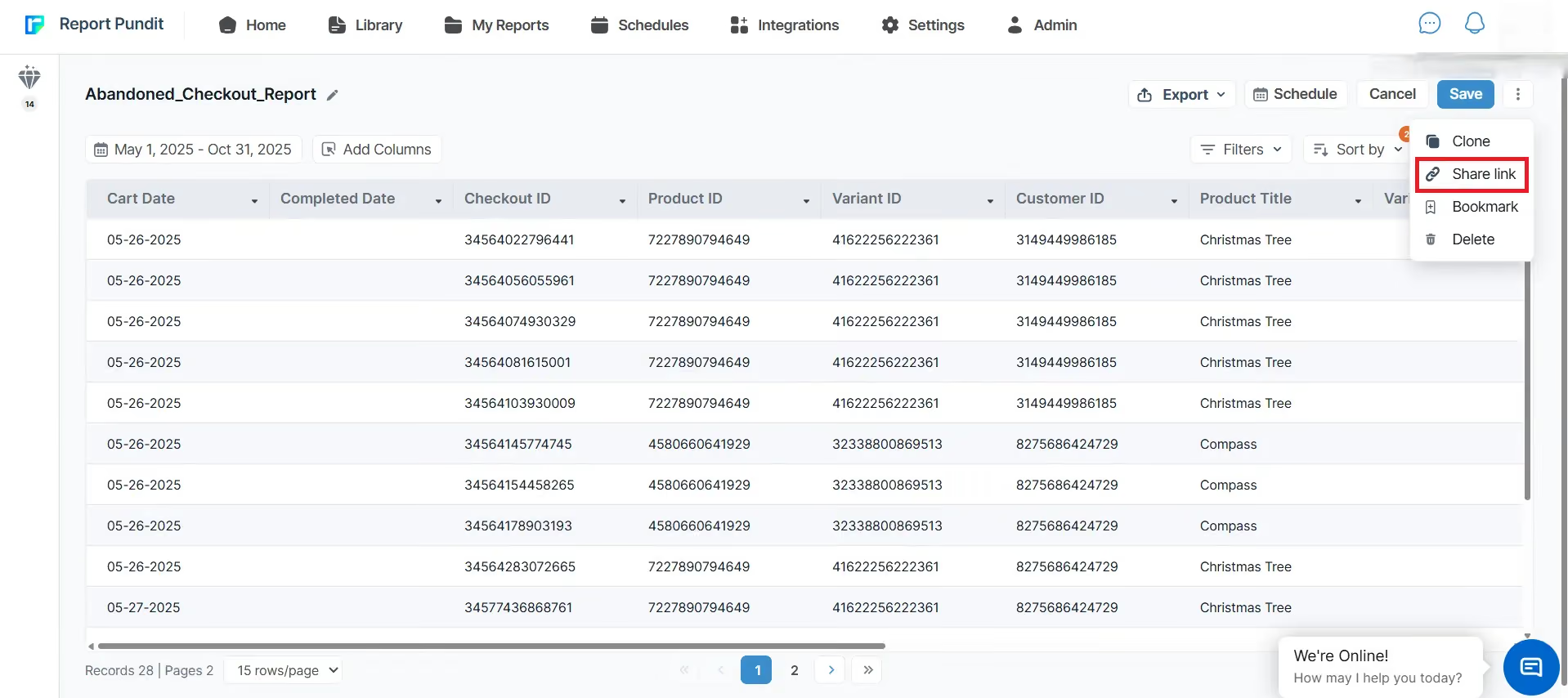
That makes it easier to build workflows like:
- Daily inventory reports for suppliers
- Weekly finance summaries for accountants
- Marketing dashboards for agencies
- Monthly performance packs for leadership
- Location-specific inventory links for B2B customers
The point is not just convenience. It is a tighter control.
A simple decision rule: When to use CSVs, when to use live shared reports
Use a CSV export when:
- The request is one-time
- The stakeholder is trusted
- The numbers are historical
- The data does not need to stay current
- The file does not need to be reused repeatedly
Use a shared live or scheduled report when:
- The report is recurring
- Multiple people need it
- The numbers change frequently
- Version control matters
- The stakeholder does not need store access
- The report should remain view-focused and consistent
That is usually the simplest dividing line.
Best practices for sharing Shopify reports securely
Before sharing any report, decide exactly what the stakeholder needs to know and nothing more.
Keep report sharing clean by following a few rules:
- Separate internal-admin users from external report viewers
- Avoid giving Shopify analytics permissions to people who only need report output
- Keep a list of which reports are shared and with whom
- Review shared access regularly
- Separate sensitive finance, customer, and operations views
- Prefer recurring scheduled reports over ad hoc file forwarding
- Use report-specific sharing instead of broad admin access whenever possible
These habits matter more as the store grows, because reporting sprawl becomes a security problem long before teams realize it.
A practical example
A merchant with multiple warehouses may want to show live inventory availability to B2B customers or distributors without giving them Shopify access.
That stakeholder might only need:
- product name
- SKU
- available quantity
- location-specific stock visibility
This is a good example of where a shared, view-only reporting layer is better than a staff account. The stakeholder gets the data. The merchant keeps admin access private. And the inventory view can stay current without repeated manual exports.

FAQ
Can I share Shopify reports without giving store access?
Yes. Shopify natively handles report access through staff permissions, but many merchants use reporting tools and scheduled exports to share data without giving admin access to the store.
Can Shopify restrict staff to only certain reports?
No. Shopify’s analytics permissions let users access reports and dashboards, and Shopify does not let merchants specify access to only certain reports.
Can staff with analytics access see custom reports?
Yes. Staff with analytics permissions can access all reports you create or modify, and they can duplicate and modify custom reports too.
Is exporting Shopify reports as CSV enough for ongoing reporting?
Usually not. CSVs work well for one-time reporting, but they become outdated and harder to manage once the workflow becomes recurring.
What is the best way to share Shopify reports with agencies or vendors?
For most external stakeholders, a shared dashboard, report link, or scheduled report is better than giving admin access. That keeps visibility narrower and reduces risk.
Can Report Pundit share reports without giving Shopify access?
Yes. Report Pundit supports scheduled delivery, dashboard sharing, and exports to destinations such as Google Sheets, Slack, CSV, Excel, and PDF, which makes it a practical solution for secure stakeholder reporting outside Shopify admin.
Closing
The safest way to share Shopify reports is not to widen store access every time someone asks for data.
Shopify’s native permissions work well for staff who genuinely need to work inside the admin. But for vendors, accountants, agencies, investors, and other external stakeholders, a dedicated report-sharing workflow is usually the better path.
That is where Report Pundit helps. It gives merchants a way to share live reports or schedule Shopify report with the right people, in the right format, without turning every reporting request into a store-access decision.

5.0 ( 2000+ Reviews)