
What Is the Shopify Sales by Device ID Report?
The Sales by Device ID Report groups Shopify POS sales by the individual device or register that processed each sale, giving every till its own line for net sales, orders, average order value, and refunds. It is a retail report, built on in-person transactions rung through Shopify POS.
The distinction that trips people up is device versus location. A store can run several registers under one location, and a location total can balance perfectly while one drawer is short. This report drills past the location to the single device, which is the level you actually reconcile a cash drawer against at close.
Merchants reach for it when a store total is not specific enough: to match each register to its drawer, to see which checkout point is carrying the floor, and to spot a device with a refund pattern worth a closer look.
Note: device-level detail depends on how your POS hardware is registered in Shopify and on your POS tier. [verify]
Which Fields Are Included in the Shopify Sales by Device ID Report?
These fields let you evaluate one register at a time rather than a blended store figure.
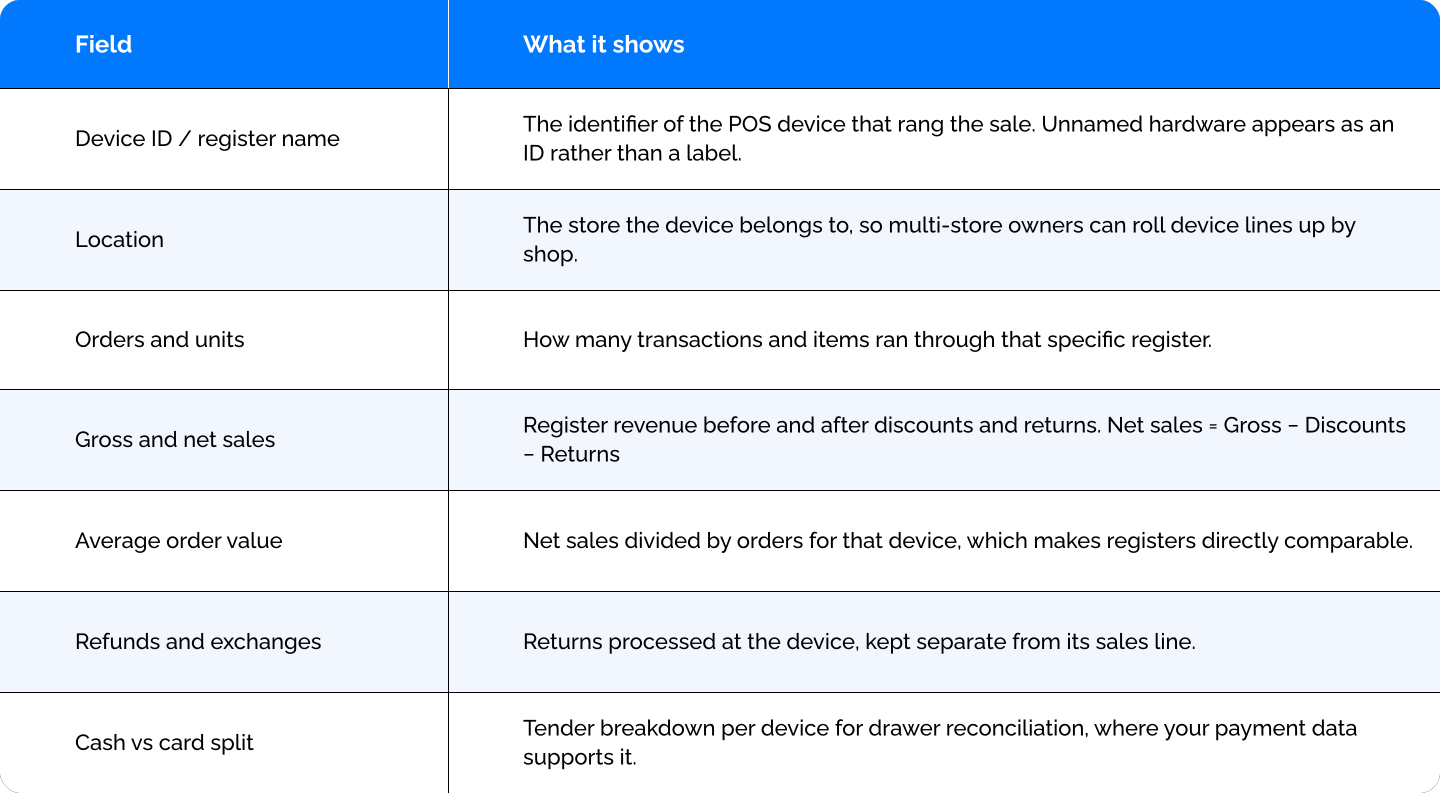
You can customize the pre-made report by adding, removing, or rearranging fields, or by grouping device then staff to see who worked each register.
Important Insights You Can Find in This Report
Does each register's net sales and tender split match its counted drawer at close?
This is the report's core job. Read net sales and the cash-versus-card split for a single device over one day, then compare it against the physical drawer count. A store-level total can look right while one till is over or short. The device line is where that discrepancy actually surfaces, so you can resolve it before close instead of chasing it the next morning.
Which checkout point is carrying the floor, and which one is redundant?
Compare orders, units, and AOV across registers over a month. A device ringing a fraction of the others' volume may be badly placed or simply unnecessary. A register with a noticeably higher AOV usually traces back to placement or who is stationed there. That comparison feeds real decisions: move a slow checkout point, retire it, or reinforce the busy one with staff.
Is one device showing an unusual refund share?
Pull refunds and exchanges by device and look at each register's refund total against its sales. One till with a refund share well above the others is worth investigating, whether the cause is a training gap, a policy being applied loosely, or something that belongs with loss prevention. Reading refunds beside the device's own sales keeps a high-volume register from looking alarming just because it processes more of everything.
THE ANALYST'S READ:
Raw net sales per device is a misleading way to judge a register, because two tills rarely run for the same number of hours. A checkout opened only during the lunch rush can post lower totals than one staffed all day and still be the more productive piece of hardware per open hour. Before retiring or repositioning a device on volume alone, compare each register's net sales against how long it was actually open or staffed. If a low-total device turns out to be the strongest earner per open hour, its problem is availability, not placement, and the fix is scheduling rather than moving hardware. Report Pundit doesn't track open hours itself, so this usually means adding your own hours context alongside the device figures. When several closes point the same way, you have a defensible utilization signal rather than a one-day impression.
How Can You Automate the Sales by Device ID Report?
Once the report is grouped and filtered the way you want it, you do not have to rebuild it. Report Pundit can:
- Schedule it to send automatically, including a daily close-out to store managers
- Deliver as Excel, CSV, or PDF, or push live to Google Sheets
- Send to email, Google Drive, and other supported destinations
- Group by week or month so you see device trends instead of a single snapshot
Frequently Asked Questions
Do I need Shopify POS for this report?
Yes. Device-level data comes from Shopify POS activity, so the report only covers in-person sales. Without POS in use there are no registers to break down.
How is this different from the Sales by POS report?
Sales by POS groups by location and staff and shows the register as one column in a broader operational view. This report makes the individual device the unit of analysis, which is what you want for till-by-till drawer reconciliation and for comparing hardware utilization within a store.
Does it include online (non-POS) sales?
No. Despite what "device" might suggest, this is not a browser breakdown of mobile versus desktop shoppers. It groups in-person sales by the physical POS register that processed them. For online channel splits, use the Sales by Channel report instead.
Will it show a friendly register name?
It shows whatever identifier your POS hardware is registered with. If your devices are not named in Shopify, they appear as IDs, so it is worth naming them for readable reports. [verify]
Can I reconcile a cash drawer with this report?
Yes, where your payment data exposes a tender split. Read a single device's net sales and its cash-versus-card breakdown for the day, then match that against the counted drawer to find a short or over till. [verify]
Can I compare the same registers across multiple store locations?
Yes. Keep the Location field in the report and multi-store owners can roll device lines up by shop, which helps right-size how many registers each store actually needs.