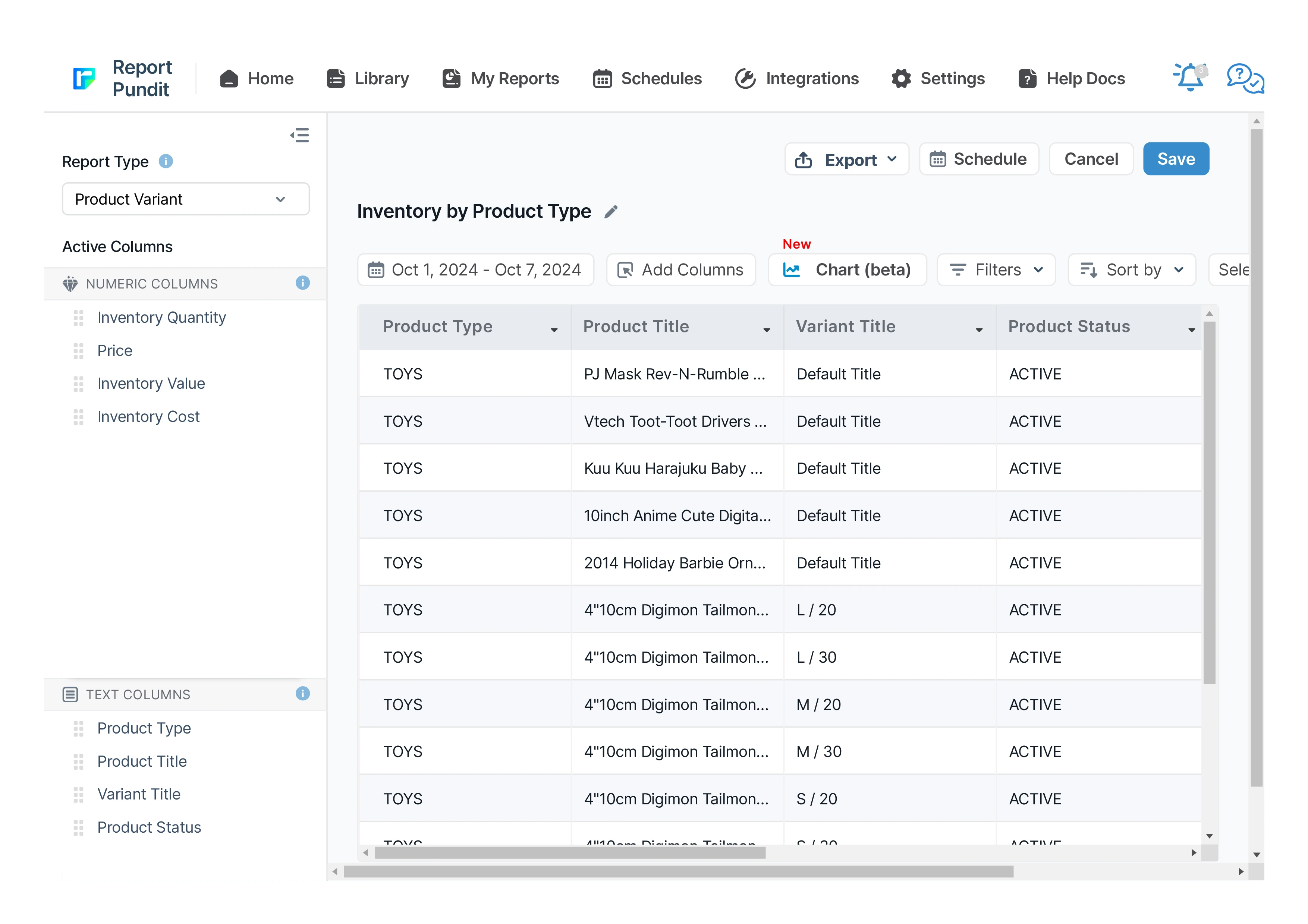
Inventory by Product Type Report for Shopify
This is grouped inventory data organized by custom product types, alongside product and variant details, providing a comprehensive view to analyze overall inventory status.
5 from 1,800+ merchants
2,000+ data fields
Trusted by 40,000+ Shopify stores
Updated June 2026
Why the Inventory by Product Type Report matters
The most expensive inventory mistakes happen at the category level, not the SKU level. Over-buying an entire product type for a season costs far more than over-buying one SKU. Yet most inventory reports show you data SKU-by-SKU, requiring mental aggregation you can't do reliably across 5,000+ variants.
The Inventory by Product Type Report rolls the data up to the level merchandisers and buyers actually plan at. You see total stock per type, total inventory value per type, and (with added columns) total sales per type. That's the view that tells you whether your category mix is healthy - and where the next season's PO needs adjustment.
For seasonal merchants, fashion brands, and multi-line retailers, this is the report that drives buying meetings.
What's included in the report
Category dimension - Product Type - The category defined on each Shopify product.
Aggregated metrics - Total Products - Number of distinct products in the type.
Total Variants - Number of variants in the type.
Total Inventory Quantity - Sum of units across all variants in the type.
Total Inventory Value - Sum of Quantity × Price across the type.
Drill-down columns - Product Title · Variant Title · SKU · Vendor · Location · Inventory Quantity · Inventory Value
Sales by Product Type (last 30/90 days) · Sell-Through Rate · Inventory Days Remaining per type · Average Margin per type · Stock-to-Sales Ratio
Who uses this report - 4 scenarios
1. Merchandisers planning the next season's buy
2. Buyers reviewing category health
3. Founders running portfolio analysis
4. Planners running sell-through review
How to read the Inventory by Product Type Report
• Stock-to-Sales ratio by type. Healthy = 1-2× monthly sales. Above 3× = overstocked category; below 1× = understocked.
• Concentration risk. If one type holds 50%+ of total Inventory Value, you're concentrated. Healthy mix or risk?
• Empty or near-empty types. A product type with very few variants in stock - discontinue, refresh, or restock?
• Sales vs. stock disconnect. A type taking 30% of stock value but generating only 8% of sales = the merchandising conversation.
How to build the report in Report Pundit
- Open Report Pundit from your Shopify admin and click Pre-built Reports.
- Select Inventory by Product Type Report from the Inventory category.
- Apply filters (location, vendor, collection, product tag, product type, status - whatever fits).
- Customize columns - add COGS, inventory days remaining, sales velocity, sell-through, or any of 2,000+ fields.
- Run the report. Results load in seconds for most stores.
Export or schedule - Google Sheets, Excel, CSV, PDF, or scheduled email delivery to your team.
Sample report

Customization & filters
• Filter by specific Product Type(s) - focus on the categories you own
• Add Sales by Product Type (last 30 / 90 days) - pair stock with movement
• Add Sell-Through Rate - the merchandiser's headline metric
• Drill down: expand any type to see SKU-level detail
• Group by Vendor within type - for buyer reviews
• Filter by Location - category mix per warehouse
Automate & export
- Schedules — hourly, daily, weekly, monthly, or custom cron
- Delivery formats — Excel, CSV, PDF, or push to Google Sheets in real time
- Group by month or week — trends instead of a static snapshot
- Destinations — email (multiple recipients), Google Sheets, Google Drive, FTP/SFTP, Looker Studio, BigQuery
- Conditional alerts — get notified only if a channel's net sales drop more than X% week-over-week
Report Pundit vs Shopify's native Sales by Channel report
Frequently Asked Questions
A report that aggregates your stock by product type or category, showing total products, total variants, total quantity, and total inventory value per type - instead of one row per SKU.
From the Product Type field on each Shopify product. If your products don't have a Product Type set, you can group by Collections, Tags, or Vendor instead.
Yes. Expand any product type to see the underlying products, variants, and quantities.
Benefits

View Product Availability

Product Grouping

Inventory Status Overview
Related Reports
Low Stock Product
The Low Stock Product Report highlights products that are approaching or have reached a low stock threshold, helping Shopify merchants proactively manage restocking needs. This report is crucial for preventing stockouts on popular items and ensuring seamless sales without interruption
Inventory Transfers
Every stock movement between your locations in one view — origin, destination, status, and received-vs-rejected quantities — so you can balance stock, reconcile transfers, and measure internal lead times.
Inventory by Location
A report organized by inventory locations, detailing products and variants on hand, with a breakdown of the value for each product.
Inventory Cost
The Inventory Cost Report provides a comprehensive analysis of the costs associated with your inventory, giving you a clear view of the financial investment tied up in stock. This report calculates the cost of inventory on hand and can include both current and historical cost data
Inventory On Specific Day
A point-in-time snapshot of exactly what you had in stock on any past date — by product, variant, SKU, and location — for month-end accounting, audits, and cross-date comparison.
Inventory Sale Value
A report outlining the sale value of your inventory, including details on product quantities, variants, collections, and total value based on current sale prices for analysis.
Inventory Shipments
Every inbound shipment tracked end to end — shipped, received, accepted, and rejected quantities with acceptance rate — so you can catch discrepancies, plan around arrivals, and benchmark supplier reliability.
Inventory by Collections
This report provides a detailed view of inventory levels, organized by product collections, allowing businesses to track stock availability and manage inventory efficiently.
Inventory level Indicator
The report provides Shopify merchants with a real-time analysis of stock levels, highlighting products that are overstocked, optimally stocked, or understocked. This report is essential for monitoring stock health and ensuring that inventory levels align with demand.
Inventory on Hand
A real-time snapshot of every product, variant, and SKU in stock - across every warehouse, retail location, and 3PL - with vendor, cost, and inventory value in a single view.
Out of Stock Product
A report listing products that are out of stock, including essential details such as product inventory and the location where the stock was depleted.
Inventory Replenishment
A ready-to-action list of exactly which products need reordering now — driven by real sell-through velocity, adjusted for stock already on its way, and broken down by location.
ABC Analysis
Every product graded A, B, or C by its share of revenue — so you can pour stock investment into the items that earn it, and stop over-buying the ones that don’t.
Inventory Reorder Point
This report helps identify the exact point at which inventory should be restocked to prevent any interruptions in product availability, ensuring a smooth supply chain from both your inventory and your vendor's end. It informs the merchant about the sales velocity, lead time, and safety stock.
Build and automate your Shopify Reporting
Unlock the full potential of your Shopify store with Report Pundit. Gain access to over 2000 data fields, automate reports, and make data-backed decisions to grow your business.
.png)
.png)