
How to Share Shopify Reports With Stakeholders Without Giving Store Access

.svg)
.svg)
.svg)
As your Shopify store grows, more people in your team need access to data. Your inventory team needs stock numbers. Your finance team needs sales and payout reports. Your marketing team wants to track campaign results. Your support team needs customer and order details. And the problem is that all Shopify reports are inside the Shopify admin.
To share these reports, you often have to give admin access even when it is not really needed. This can expose sensitive information like store settings, customer data, and payment details. As your team grows, this starts to feel risky and hard to manage.
You want to share the right reports with the right people, but you do not want to share store login details or give full admin access. So the point is, how can you share Shopify reports safely while keeping your store data protected? There’s no need to worry, you’ll find the solution discussed later in this report.
Can Shopify Restrict Staff From Exporting Reports
As your business grows, you need to balance keeping stakeholders informed with protecting sensitive store data. What starts as a simple CSV export can quickly become a manual process with security risks, duplicated work, and unclear data ownership. Understanding these challenges is key before exploring solutions.
Once a staff member has access to analytics or reports:
- They can typically view all available reports
- They can usually export reports as CSV files
- There’s no native way to make reports view-only without export access
- You can rely on permissions to limit who can view reports rather than controlling export actions.
- You cannot give access to any specific reports
So, how do you share reports with your Stakeholders?
Method One: Exporting Shopify Reports as CSV Files
The most common and easiest way to share Shopify reports is by exporting them directly from Shopify Analytics. This method is often the first option store owners use because it is built into Shopify and does not require any additional tools.
When to use CSV exports:
- One-time requests: Ideal when answering a single question or request from a stakeholder.
- Trusted internal teams: Works well for small teams where everyone handling the report is already trusted.
- Historical reviews: Useful for reviewing past performance or completed sales periods.
- Snapshot reporting: Appropriate when stakeholders do not need continuous access to updated data.
- Low-frequency reporting: Efficient for occasional reports, such as monthly summaries or quarterly reviews.
- Simple metrics: Best suited when only basic sales, revenue, or order counts are needed.
- Staff access limitations by Shopify plan: Another important factor to consider when sharing reports through Shopify is staff access, which is restricted by your Shopify plan.
To add staff accounts for managing reports or analytics, you must upgrade to the Grow plan, Advanced plan, or Shopify Plus. This can increase costs even when your team members only need read-only access to data rather than full store permissions.
[Note: When you downgrade to a plan with fewer user slots, Shopify automatically deactivates any users above the new limit. Pending invitations are removed first, followed by active users who have been inactive recently. This makes staff-based report sharing hard to control and creates unnecessary risk for growing teams.]
Method Two: Sharing Shopify Reports Without Store Access
Unlike exporting CSV files, shareable live reports allow stakeholders to access up-to-date Shopify data without logging into your store. These reports update automatically based on scheduled or continuous data syncs, so as new orders, refunds, inventory changes, or adjustments are recorded, without needing to export or share files.
For internal teams, user management works best and is highly recommended for staff members who actively work inside the store. They can see customer details, product data, and operational reports based on the assigned permissions
However, this approach is not ideal for external stakeholders, since it requires giving store access and offers limited control over how reports are shared or scheduled. For that reason, merchants often combine Shopify user management for staff with advanced reporting tools to securely share reports with external audiences.
How it actually works for your store:
- Use reporting or analytics tools: Shopify reporting apps allow you to create dashboards and reports that can be shared inside your business without giving store access.
- Create read-only dashboards: You can configure reports so that stakeholders see only the metrics they need, such as revenue, profit, or inventory performance.
- Schedule automated updates: It allows scheduled emails of reports, so stakeholders receive the latest data with automated updates.
- Control access: You can manage who sees what, set permissions, and revoke access at any time.
When is the right time to Use Each Method
When it comes to sharing Shopify reports, the right method depends on how often you share data, who needs access to it, and how sensitive that data is. Exporting reports as CSV works well when your needs are basic. If you are sharing data with a small trusted team or reviewing past performance, a CSV export is usually enough. It gives you a quick snapshot without adding extra tools, though the data becomes outdated if orders, refunds, or adjustments occur after exporting the shared file, no longer reflecting current performance. But still, for small stores or occasional reporting, this approach gets the job done. However, when it comes to inventory re-order notifications, static CSV reports can fall short. Inventory levels change constantly as new orders come in, returns are processed, or stock is adjusted.
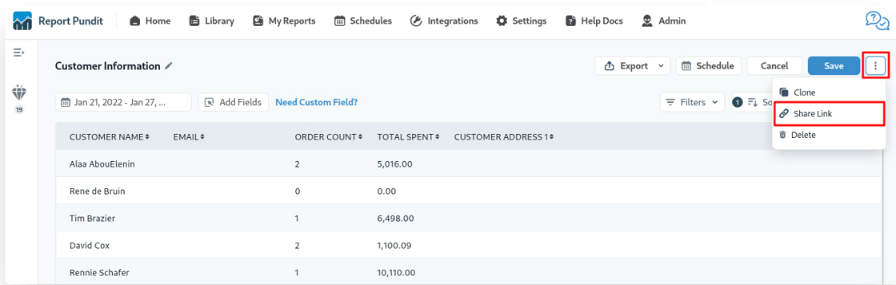
Whereas using shared reports makes more sense once reporting becomes frequent. When you are sending daily, weekly, or monthly and multiple updates to suppliers, accountants, and delivery partners. Example: If you need vendor-specific product reports covering sales, customers, or marketing performance, Shopify does not provide all this information in a single report. Product-related data is spread across different sections of the platform, requiring merchants to manually consolidate information. Report Pundit solves this by offering a dedicated Product Reports section that brings all relevant data into one consolidated, easy-to-analyze report.
[Note: Investors, working with agencies, or sharing data with finance teams, live reports save time and reduce mistakes. Everyone sees the same up-to-date numbers, and you no longer have to worry about outdated files or multiple versions floating around.]
Best Practices for Sharing Shopify Reports Securely
This section explains how merchants can share Shopify reports with internal teams and external stakeholders without exposing their Shopify admin.
- Know what data you are sharing: Before sharing any Shopify report, understand who will see it and what type of data it contains. Sensitive customer or financial data should always have stricter access controls.
- Maintain a clear report inventory: Keep track of which reports are being shared, what data they include, and who has access. This makes it easier to manage permissions and respond quickly to data-related issues such as inventory-reorder data requests.
- Review access regularly: Secure reporting is ongoing. Regularly audit report access, remove unused permissions, and monitor shared links to keep your data protected over time.
Case Study
One of our clients wanted to share live inventory availability with their B2B customers without giving them access to the Shopify admin. They wanted to provide a simple view showing product name, SKU, available quantity, and inventory location, while keeping the data view only and accessible through a shareable link.
To help them right, our team created a custom inventory report using Report Pundit and configured it to pull stock data by inventory location. Separate reports were generated for each warehouse, allowing the merchant to share one link for Spain and another for Italy. We used the Shareable Link feature to make the reports accessible through a public or password-protected URL, eliminating the need to create Shopify staff accounts for external users.
Since inventory updates are controlled by Shopify’s data synchronization process, we helped the client understand how syncing works. As a result, the client was able to securely share live inventory data with B2B customers, reduce manual reporting, and controlled over store access.

Conclusion
When your business starts managing more data and more stakeholders, sharing the right information without compromising security becomes critical. CSV exports can work for one-time snapshots or small trusted teams, but they quickly become outdated, time-consuming, and prone to errors. Live shareable reports, on the other hand, let you give stakeholders real-time, view-only access to the data they need without giving them admin access.
By combining user management access for your team with live reports for external stakeholders, you can control exactly who sees what, schedule automatic updates, and even create separate reports for different locations or metrics. This approach keeps your data secure, reduces manual work, and ensures everyone is working from the same accurate numbers. Ultimately, sharing Shopify reports becomes simple and professional, helping your business run more efficiently while protecting sensitive information.
Frequently Asked Questions
- Can I share Shopify data without giving store access?
Yes, you can use your Shopify data and share view-only reports using secure links, without giving admin access.
- Is exporting Shopify reports as CSV files good for ongoing reporting?
No, as CSV exports work for one-time sharing, and they become outdated as soon as data changes.
- Can Shopify reports be shared with external partners like B2B customers?
Yes, reports can be shared with external partners without accessing the Shopify admin.







.webp)
.webp)














Build and automate your Shopify Reporting
Unlock the full potential of your Shopify store with Report Pundit. Gain access to over 2000 data fields, automate reports, and make data-backed decisions to grow your business.