How to Use Shopify Discount Reports to Measure What Drives Sales

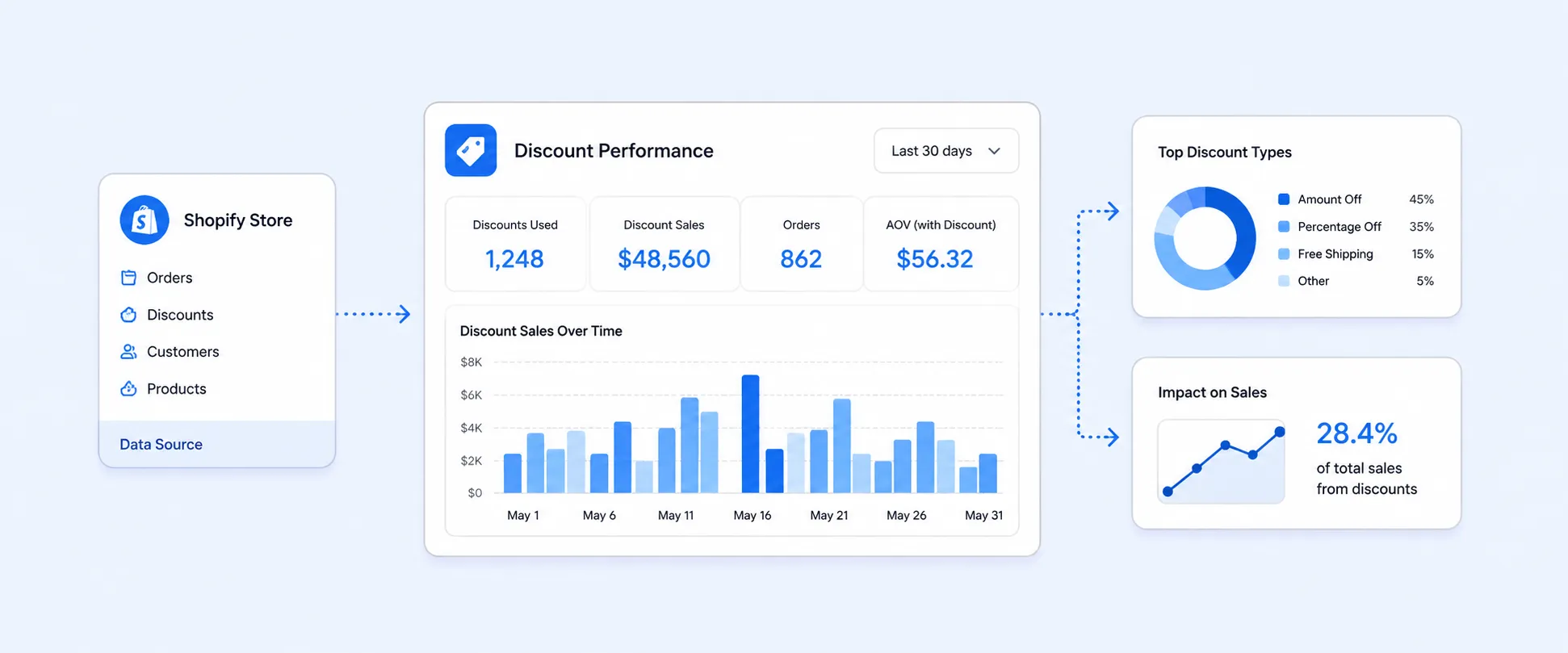
How to Use Shopify Discount Reports to Understand What’s Actually Driving Your Sales
Discounts can lift conversions fast, but they can also hide weak merchandising, train customers to wait for coupons, and quietly eat into margin. That is why the important question is not “Did the campaign create orders?” It is “Did this discount create profitable growth, or did it just make existing demand cheaper?”
Shopify does give merchants native reporting for this. The two most useful places to start are Sales by Discount Codes and Discounts by Order. They answer different questions, and using the wrong one is where a lot of discount analysis goes off track.
If you want to understand which codes are actually pulling their weight, you need to look beyond raw usage counts. The better lens is how discount type, discount method, order mix, returns, and total sales move together over time. Shopify’s current reporting model supports much of that natively, but there are still limits once you want deeper comparisons or more customized views.
The mistake most merchants make with discount analysis
Many stores judge promotions by one simple signal: orders went up, so the discount worked.
That is not enough. A discount can increase order count and still be a weak campaign. Maybe it lowered average realized revenue per order. Maybe it mostly converted customers who would have bought anyway. Maybe a sitewide code looked strong, but a smaller email-only code actually produced better order quality. Shopify’s discount reports are useful because they let you separate “usage” from “performance.”
The other common mistake is mixing up order-level and code-level reporting. Merchants often want to know “Which discount drove the most sales?” but then open an order-level report. Or they want to inspect how discounts affected individual orders, but start with a grouped discount-code report. Shopify splits these use cases into separate reports for a reason.
The two Shopify discount reports that matter most
Sales by discount codes
This is the report to use when your question is campaign-focused. Shopify describes ‘Sales by discount codes’ as a report that groups sales by the name of the discount, whether that is an automatic discount name or a code entered at checkout. It helps you see how often discounts were applied and which ones are converting into the most sales.
It also includes useful dimensions and metrics such as:
- Discount name
- Discount code
- Discount class
- Discount method
- Discount type
- Discount amount
- Orders
- Total sales
- Shipping
- Other discounts on the same order
That makes it the best native Shopify report for comparing one promotion against another.
Discounts by order
This is the report to use when your question is order-focused. Shopify’s Discounts by Order report shows discounts customers received through discount codes at checkout and also includes discounts applied during checkout in Shopify POS. It distinguishes between line-item discounts and order-level discounts, which matters when you are trying to understand how the discount was applied within the order.
This report is much better for examining how discounts show up inside actual transactions and how they interact with the rest of the order economics.
What each report is really telling you
Here is the simplest way to think about it.
Sales by discount codes tells you how a promotion performed as a promotion.
Discounts by order tells you how discounts affected individual transactions.
That difference matters because the numbers are not meant to answer the same business question. If you are reviewing an influencer code, a welcome offer, or a seasonal campaign, start with Sales by discount codes. If you are checking how discounts are impacting specific orders, returns, and total sales at the transaction level, start with Discounts by order.
One important Shopify caveat merchants should not miss
If your store allows combinable discounts, Shopify says the same order can appear multiple times in the Sales by discount codes report. The order shows once for each applied discount. That means a code-level report is great for measuring discount participation, but it can also mislead you if you assume each row equals one unique order with no overlap.
This is one of the biggest reasons merchants get confused when totals in discount reporting do not line up neatly with what they expect from broader sales reports or from the discount’s performance view elsewhere in the admin. Shopify community threads show this confusion comes up often in real stores.
What you can learn from Shopify discount reports if you read them the right way
The native reports are more useful than many merchants think.
You can use them to answer questions like:
- Which codes are actually being used versus just sitting live in your store
- Whether a code is automatic or manually entered at checkout
- Which discount types are driving more orders
- How much discount value is being given away
- Whether orders using a certain discount tend to generate meaningful total sales
That last point is important. Shopify’s Sales by Discount Codes report includes both discount fields and sales fields, which means you can look at discount behavior and commercial output together. That is the difference between “This coupon was popular” and “This coupon was commercially useful.”
What “good” discount analysis looks like in practice
A strong discount review usually follows this sequence:
- First, identify which discounts are driving the highest order count and total sales.
- Next, separate automatic discounts from entered codes.
- Then compare discount types, such as percentage, fixed amount, free shipping, Buy X Get Y, or app-driven discounts.
- Finally, review order-level behavior to see whether the promotion is associated with healthier orders or just more discounted ones.
This approach works because it mirrors how Shopify itself structures the data. The code-level report shows campaign performance. The order-level report shows how that campaign landed inside orders. Used together, they give you a more complete picture than either report alone.
The discount types Shopify supports and why they behave differently
Shopify’s discount system supports discount codes and automatic discounts, including fixed amount discounts, percentage discounts, Buy X Get Y, and free shipping. Shopify also notes that third-party apps can create other discount types, and Plus merchants can build custom discount apps.
That matters because not all discounts change customer behavior in the same way.
A percentage-off order discount often behaves like a broad conversion lever. A free shipping offer often acts more like a checkout-friction remover. A Buy X Get Y deal is closer to a basket-building tactic. If you compare all of them only on raw order count, you flatten important differences in customer response. Shopify’s reporting fields, such as discount type, discount class, and discount method, make these distinctions visible.
Where to find these reports in Shopify
Shopify’s reporting lives under Analytics > Reports. From there, you can filter or open the report you need. Shopify’s Help Center documents both the Sales reports area and the Finance reports area as part of the current reports experience.
In practice:
- Sales by discount codes lives under sales reports.
- Discounts by order lives under finance reports.
If your reports layout looks different, that is usually because Shopify’s reporting UI continues to evolve. The safe phrasing is that both reports are accessible from the Reports area in Shopify Analytics.
The metrics that matter more than merchants think
When you review discount performance, do not stop at “orders” and “discount amount.”
Shopify’s current reporting fields make it possible to look at a richer set of signals, including discount name, discount method, discount type, total sales, shipping, other discounts on the same order, and order counts. In finance reports, you can also look at how discounts relate to returns, taxes, shipping charges, and net sales at the order level.
That means the better questions are:
- Did the code drive more total sales, or just more discounted sales?
- Was it mostly used with other stacked discounts?
- Did it behave differently when applied automatically versus manually?
- Did it show up in return-heavy orders?
- Was shipping doing more work than the discount itself?
These are the kinds of questions that help a merchant improve promotional strategy instead of just counting coupon use.
A simple example that shows why this matters
Imagine you run two promotions for the same month.
WELCOME10 generates more orders.
FREESHIP75 generates fewer orders.
At first glance, WELCOME10 looks like the winner.
But when you open the reports, you may find that FREESHIP75 is attached to higher-value orders and gives away less discount value relative to sales. You may also find that WELCOME10 overlaps heavily with other discounts, while FREESHIP75 stands more on its own. Shopify’s discount code report includes fields that help expose those differences.
That is how merchants move from “Which code got used most?” to “Which promotion actually deserves to stay?”
Where Shopify’s built-in discount reports start to fall short
Native reports are useful, but they are not a complete promotional analysis system.
The first limitation is comparison depth. Once you want to compare discount performance by product, customer group, sales channel, landing source, or repeat-vs-new customer behavior in one place, the built-in reports can start to feel narrow.
The second limitation is overlap. Because Shopify can count the same order under multiple applied discounts in the code-level report, analysis gets harder when you are stacking offers.
The third limitation is workflow. Many teams want one custom view that combines discount activity with broader sales context, then schedules it automatically for marketing or finance review. Shopify’s reporting framework supports customization, but deeper custom analysis often pushes merchants toward a dedicated reporting layer.
When a custom reporting setup becomes the better option
If your team runs discounts across email, paid campaigns, influencers, affiliates, loyalty, or retention flows, you usually outgrow default reporting faster than you expect.
What teams eventually want is not just a discount report. They want answers like:
- Which discount codes are increasing net commercial value, not just usage
- Which promotions are overused
- Which code families are competing with each other
- Which campaigns depend on stacking to look successful
- Which discounts are attached to better customers, not just more customers
- Evaluate abandoned cart discount strategies with Report Pundit by tracking recovered customers, generated revenue, and comparing discounted versus non-discounted carts.
- Complete details of customers, orders, discounts, locations, POS, transactions, and payouts.
That is where a tool like Report Pundit becomes the practical next step, assuming your reporting setup supports the fields and rollups you need. The benefit is not “more charts.” It is being able to build the exact discount-performance view your team actually uses, instead of forcing the question into a default report that was not designed for it.

The smartest way to review discount performance every month
A clean recurring process looks like this:
Start with Sales by discount codes to rank promotions by orders, discount amount, and total sales. Then move into Discounts by order to inspect how those discounts show up inside real transactions. After that, compare the results against your broader sales and merchandising context before deciding which promotions to expand, restrict, or retire.
This is also where finance and marketing teams tend to meet. Marketing wants to know which offer converted. Finance wants to know what it cost. Shopify gives you enough native reporting to start that conversation, but better promotional decisions usually come from looking at both sides together.
FAQ
Which Shopify report should I use to see how a discount code performed?
Use Sales by discount codes when you want to compare discount campaigns by code, method, type, orders, and total sales. Shopify describes this report as the one that helps you see how often discounts are applied and which discounts convert into the most sales.
What is the difference between Sales by discount codes and Discounts by order?
Sales by discount codes groups results by the discount itself. Discounts by order shows discounts within individual orders and distinguishes line-item discounts from order-level discounts.
Can one Shopify order appear more than once in a discount report?
Yes. Shopify says that if your store uses combinable discounts, the same order can appear multiple times in the Sales by discount codes report, once for each applied discount.
Does Shopify track automatic discounts as well as code-based discounts?
Yes. Shopify’s discount reporting includes both automatic discounts and manually entered discount codes, and the report includes fields such as discount method and automatic discount title.
Are compare-at prices included in Discounts by order?
No. Shopify explicitly states that discounts in the Discounts by order report are not related to compare-at prices.
What discount types does Shopify support?
Shopify supports fixed amount discounts, percentage discounts, free shipping discounts, and Buy X Get Y discounts through codes or automatic discounts. Shopify also notes that third-party apps can create other discount types.
Closing
Discounts are easy to launch and easy to misread.
The merchants who get the most value from promotions are usually not the ones running the biggest sale. They are the ones reading the reports correctly. When you use Sales by discount codes to evaluate campaign performance and Discounts by order to understand transaction impact, Shopify’s native reporting becomes much more useful.
And once your team needs more than a default report can comfortably show, that is usually the signal to build a custom reporting workflow around discount performance, instead of relying on surface-level coupon stats.

5.0 ( 2000+ Reviews)