
How to Track Vendor Sales Performance and Commissions in Shopify

.svg)
.svg)
.svg)
Tracking sales performance by vendor is essential for understanding who drives revenue in your Shopify store. While you purchase supplies from vendors and can assess factors like product quality, pricing, and delivery speed, the perspective that truly matters is that of your customers. As end consumers, their preferences ultimately determine a supplier’s success. Nothing reflects a vendor’s value more accurately than how well their products sell.
You often need automated daily reports that go beyond basic sales totals, as a breakdown of net sales, units sold, and commissions earned at a fixed rate (e.g., 35%) for a specific vendor, delivered automatically at a scheduled time each day. Creating and maintaining this level of detail manually can be time-consuming and error-prone.
The report provides a clear view of how each vendor contributes to total sales, helping you manage inventory, evaluate partnerships, calculate payouts, and use these insights to shape both negotiation and marketing strategies.
What Is Shopify’s Sales by Vendor Report?
Shopify’s Sales by Vendor Report gives you a straightforward way to see how each vendor contributes to overall sales by grouping. It helps identify which suppliers are driving growth and how vendor performance changes over time. However, reporting needs often go further. Merchants may want to focus on a specific vendor and analyze only cancelled or refunded orders to better understand issues like returns or fulfillment problems. For example, viewing data for a vendor and limiting the report to refunded or cancelled orders typically requires creating a separate report and saving it under the My Reports section.
This highlights the growing need for more flexible and customizable vendor reporting beyond what Shopify’s default reports offer.
Where to find it:
Shopify Admin → Analytics → Reports → Total sales by vendor.
Key Metrics Available in the Vendor Report
The report provides key sales metrics for each vendor, including:
- Product vendor
- Gross sales, discounts, refunds, net sales, and total sales
- Quantity sold
- Product details such as SKU, product title, or handle (optional dimensions available in the field selector)
How You Can Use This Shopify Vendor Sales Data
The Sales by Vendor Report supports several important business decisions:
Analyze vendor performance: Identify which vendors generate the highest sales and revenue contribution.
Track sales trends: Spot seasonal patterns or vendor-specific product successes.
Support payouts and negotiations: Rely on accurate sales data for vendor payouts, commissions, or contract discussions.
Because of this, the report is especially valuable for Shopify merchants managing multiple brands, drop-shipped products, or supplier-managed catalogs.
Things to Know About Shopify’s Vendor Reporting
If you are working with multiple brands, drop-shippers, or supplier-managed product catalogs. To maintain healthy partnerships and protect profit margins, store owners need clear visibility into how each vendor performs, how much revenue they generate, and how sales trends change over time.
While the Sales by Vendor Report is useful for basic analysis, it has several limitations for merchants who need deeper insights, greater flexibility, or scalable reporting.
Limited customization: The report structure is fixed. You can’t add custom fields such as cost, margins, product tags, or advanced SKU groupings, which restricts more detailed profitability analysis.
Restricted vendor-level filtering and granularity: For stores with many vendors and large product catalogs, it can be difficult to get a clear, high-level view of a single vendor or drill down into individual product performance. Merchants often need to manually filter, segment, or export the data for deeper analysis.
No multi-store reporting: Shopify reports are store-specific. Merchants operating multiple Shopify stores must export reports from each store and manually combine them to evaluate overall vendor performance.
Limited automation and sharing options: Shopify doesn’t support scheduled report exports, automated email delivery, or live, shareable report links. As a result, teams and vendors typically rely on static CSV or Excel files for collaboration.
Using Report Pundit for Advanced Sales by Vendor Analytics
Advanced apps extend Shopify’s Sales by Vendor reporting by adding flexibility, automation, and depth that growing merchants need. With access to over 2,000 data fields, advanced filtering, multi-store views, and automated sharing, merchants can move beyond static vendor reports and build analytics that support real business decisions without spreadsheets or manual work.
Key advantages include:
- Access to 2,000+ data fields, covering advanced sales, inventory, channel, and order-level metrics
- Flexible grouping and filtering by vendor, product, store, channel, or date
- Automated and shareable reports to streamline collaboration with vendors and internal teams
- Flexible Vendor Commission Calculation
One of the most used features of the app is its flexible commission calculation, designed to handle real-world vendor agreements.
Commission based on Gross, Net, or Total Sales: The report allows commissions to be calculated as a percentage or fixed amount based on Gross Sales, Net Sales, or Total Sales. This flexibility is especially useful when vendors are entitled to commissions on the full sales value before discounts or returns, or on net revenue after adjustments.
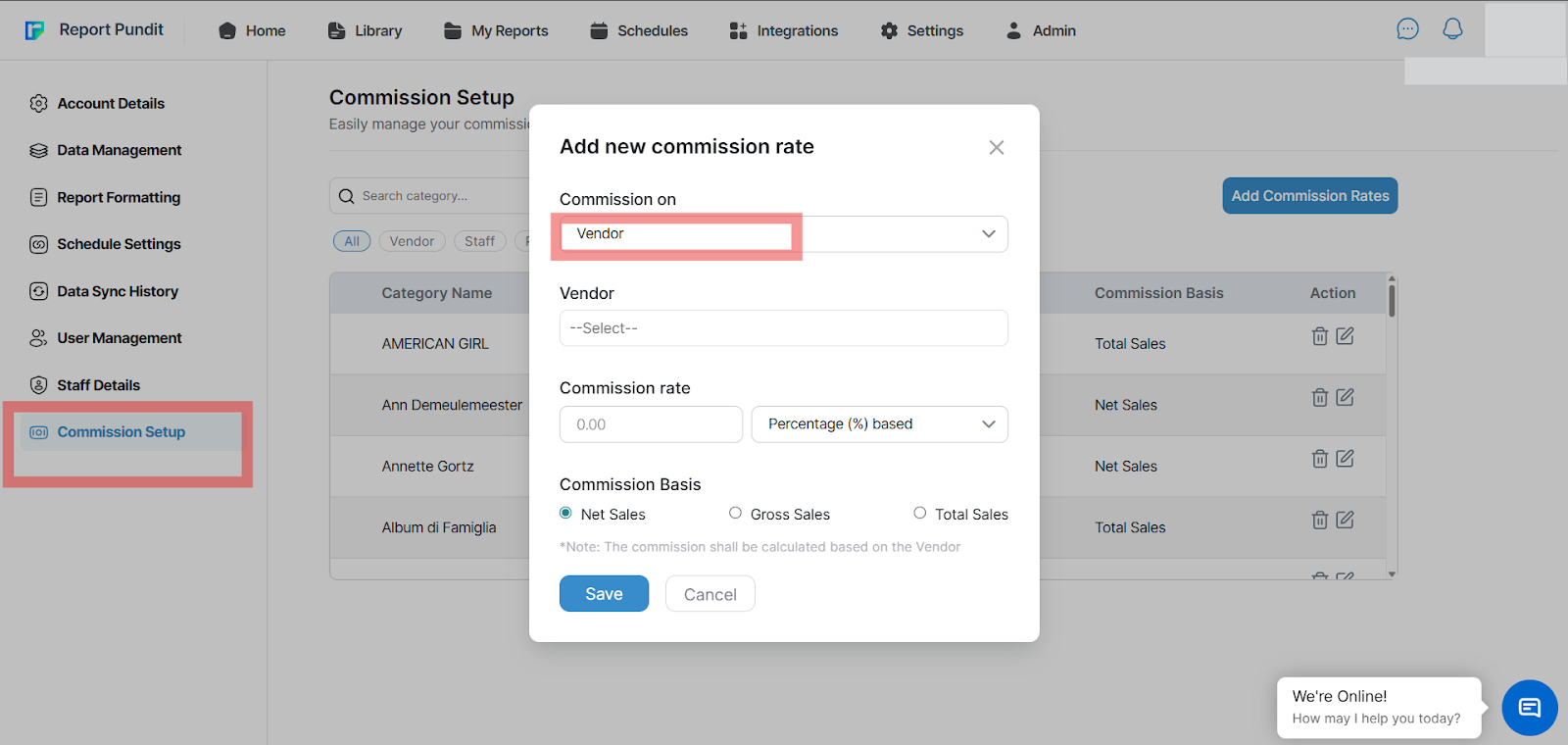
Percentage-based commission: You can define a commission percentage at the vendor, product, or collection level. For example, if a vendor’s commission rate is 10% and their net sales total $1,000, as it automatically calculates a $100 commission. Different commission rates can be applied to different vendors or product groups, supporting complex payout structures.
Fixed-amount commission: Alternatively, commissions can be set as a fixed amount per sale or transaction, such as $50 per order, regardless of order value. This is ideal for vendors with flat-fee agreements or consistent per-unit payouts.
Multi-Store and Channel Comparison: For merchants operating multiple Shopify stores, Report Pundit provides a unified view of vendor performance across all storefronts. Instead of exporting and merging reports manually, you can compare sales, commissions, and inventory for the same vendor across multiple stores in a single report.
In addition, this report gives sales channel filtering, allowing you to analyze vendor performance across channels such as the online store, POS, Amazon, eBay, and other marketplaces. This helps identify where vendors perform best and which channels drive the highest returns.
Advanced Inventory Breakdown by Vendor: Beyond sales data, the app delivers deep inventory visibility at the vendor level, supporting better forecasting and replenishment decisions. Available inventory metrics include:
- Available quantity
- On-hand quantity
- Incoming quantity
- Committed and reserved stock
- Safety stock and quality control quantities
- Damaged inventory
This level of granularity is essential for merchants managing large catalogs, vendor-managed inventory, or complex supply chains, as insights are not available in Shopify’s native vendor report.
Automating Vendor Reports and Sharing Results: It removes manual reporting from the workflow by enabling fully automated report delivery. Merchants can schedule daily, weekly, or monthly reports to be sent automatically via email or exported to Google Sheets or Excel.
For ongoing collaboration, we also offer secure, shareable report links with access controls. This allows vendors, store owners, or internal teams to view real-time data without requiring accounts, eliminating the need for static CSV files and repeated exports.
A Case Study
A Shopify merchant managing vendor-based products needed a reliable way to track vendor sales and calculate a fixed 35% commission without relying on manual exports. While Shopify’s native reports provided basic sales data, they lacked the flexibility to filter orders by product tags, validate newly placed orders in real time, and include additional details like customer names for transparency.
Using our app, the merchant built a custom vendor report that applied commission calculations directly to total sales and filtered orders using a specific product tag (e.g., “rowing”). The report was easily adjusted to show recent orders by updating the date range, and new data appeared after a quick refresh, ensuring that vendor sales were being captured accurately as orders came in.
Within a single setup session, the merchant got a clear, commission-ready view of vendor performance with the ability to add or remove columns as needed. This literally removed the manual reconciliation, improved the reporting accuracy, and delivered the vendor-level transparency required to support payouts and ongoing vendor relationships.
Conclusion
Tracking sales by vendor isn’t just about knowing who sells the most; it’s about understanding how each vendor contributes to your store’s growth, margins, and inventory flow. Shopify’s built-in reports provide a solid foundation, but as your business scales, visibility into commissions, channels, and multi-store data becomes increasingly essential.
By extending these insights with advanced apps, you can shift from manual tracking to automated, vendor-ready reports that run themselves. The result is fewer data errors, more accurate payouts, and faster decision-making, all without spending hours compiling spreadsheets. That’s how vendor reporting turns from a routine task into a core part of strategic business management.



-%20Report.jpg)






Build and automate your Shopify Reporting
Unlock the full potential of your Shopify store with Report Pundit. Gain access to over 2000 data fields, automate reports, and make data-backed decisions to grow your business.