
The Right Way to Report EU VAT(IOSS) on Deposit-Based Orders in Shopify

.svg)
.svg)
.svg)
E-commerce has grown significantly over the years, making it easier for businesses to sell to customers around the world. However, this expansion also introduces new challenges, especially when it comes to international tax compliance. To help simplify this process, the European Union launched the Import One Stop Shop (IOSS) in 2021, enabling businesses to manage VAT more efficiently. In this guide, we’ll walk you through the steps to use IOSS and keep your business fully VAT compliant.
Here you’ll get to know the fundamentals of IOSS, outline key reporting considerations, and demonstrate how you can create precise custom reports using Report Pundit to support smooth and compliant VAT filing.
What Is IOSS and Why Does It Matter for EU VAT Compliance
Instead of VAT being processed at customs, you can register for an IOSS number, collect VAT at checkout based on your customer’s EU country, and remit payments monthly through a single EU member state. This results in faster deliveries, a smoother customer experience, and reduced administrative effort on your end.
This is important because non-compliance with VAT regulations can lead to heavy penalties, shipping delays, or costly audits across multiple EU countries. If you run a Shopify store that ships to the EU, you are accessing a market of more than 450 million potential customers. Since IOSS covers a significant portion of cross-border ecommerce orders under 150 euros, it can play a key role in your international growth strategy. With accurate VAT tracking, you can recover eligible input VAT, avoid double taxation, safeguard your profit margins, and scale your global sales with greater confidence and fewer compliance risks.
Why Shopify Does Not Provide a Native IOSS Report
Shopify does not offer VAT return filings on your behalf, but it can assist with VAT calculations to simplify part of the process. Shopify applies standard VAT rates, which are updated regularly, though it is still important to verify that the rates are accurate for your business. If needed, you can manually adjust tax rates to ensure they align with your local requirements.
To modify VAT calculation settings, you can access the Shopify admin dashboard. Navigate to Customs Duties and Taxes, then configure the relevant options under Tax settings based on your business needs.
It is also worth noting that Shopify calculates and rounds VAT at the individual product line level. The total tax amount for an order is determined by applying the tax rate to each line item, rounding the result, and then adding these subtotals to calculate the final tax value.
Managing VAT returns for your Shopify store
You are responsible for handling your VAT, and while Shopify can help with some calculations, it does not file VAT returns for you. There are two main ways to handle VAT when selling to the EU.
The first way is to register for VAT in each country where you have customers. For example, if you sell to Italy, France, and Spain, you need a VAT number in each country and must submit regular VAT returns to their tax authorities.
The second way is to use the One Stop Shop, or OSS. If your sales across the EU exceed 10,000 euros per year, you can file a single quarterly VAT return in your home country instead of filing separately in every country you sell to. This makes managing VAT simpler and saves time, while keeping your business compliant.
Display Prices Including VAT
You can also make your store more transparent for international buyers by showing prices that include VAT. This way, your customers see the total cost upfront and are not surprised at checkout.
- In Shopify, go to Tax Settings and select the buyer’s country, then enable Include Tax
- You can check the correct VAT rates for all EU countries if you are unsure.
- Another option is to use a geolocation app from the Shopify App Store. These apps detect the customer’s location and automatically display sales prices with the correct VAT rate for that region.
Using Report Pundit to Build Custom VAT Reports
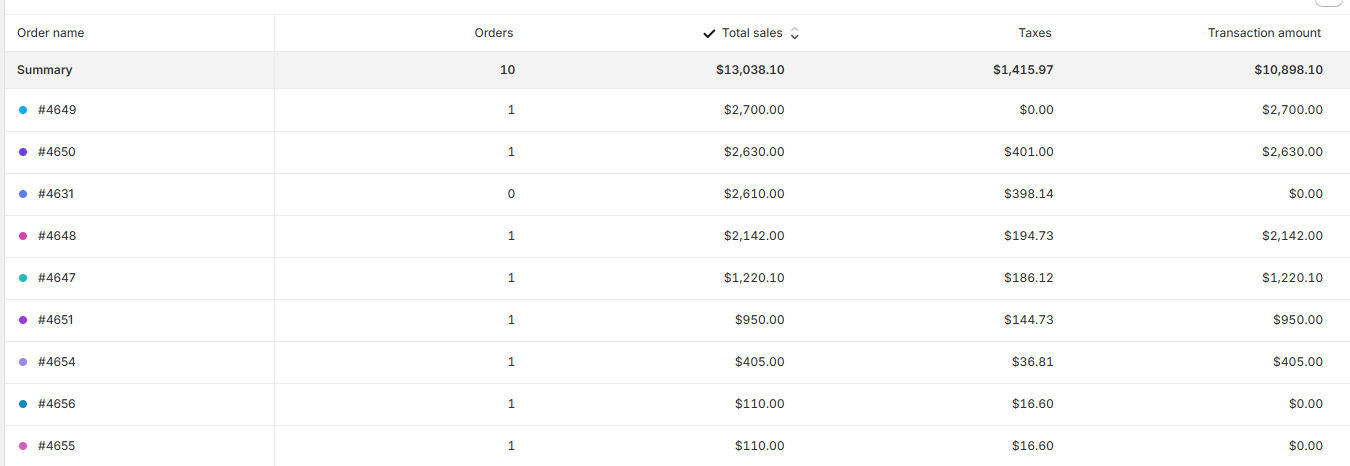
Shopify calculates tax based on the order and its line items, but payments may be divided into multiple transactions. This is why VAT reporting can get complicated when dealing with deposits, partial captures, or refunds. To calculate tax on the amount paid, you would need to create a sales level report, include the relevant fields, export it, and perform the calculations manually. If you want, you can skip this manual task by using Report Pundit, which can help, as it automatically calculates tax based on the transaction amount.
It lets you create custom reports, including detailed tax reports such as GST and VAT reports and tax reports by country, state, tax rate, or tax refund. Our live chat experts can also build custom reports for you. This means you can request a custom VAT or IOSS-style report, for example, EU sales under 150 euros, VAT collected, and the destination country.
What to include in an IOSS-focused report
- Order filters: Shipped to the EU, typically orders 150 euros or less (to match IOSS requirements)
- Origin country: Country of origin for each order
- Destination country VAT: VAT charged according to the customer’s EU country, as IOSS requires destination-based VAT
- Tax fields: Total VAT collected, refunds and adjustments, and breakdown by country and tax rate
- Tax ID: For compliance and reporting purposes
How Report Pundit helps with IOSS and VAT reporting
- Tracks sales per EU country and ensures VAT is calculated correctly for each destination
- Clarifies currency differences, for example, SEK versus EUR, and shows how refunds or adjustments affect payouts
- Creates combined reports showing sales summaries alongside country-specific details, simplifying VAT tracking across multiple countries
- Provides payout reports showing exact funds received per order, supporting accurate VAT accounting under IOSS
- Offers guidance on how timing, refunds, and currency conversions can affect VAT reporting, helping you stay compliant
Conclusion
Navigating EU VAT compliance should not be a headache. With IOSS, you can simplify VAT collection for low-value EU sales, provide a simple checkout experience for your customers, and reduce administrative burdens. While Shopify helps with basic tax calculations, third-party apps can provide advanced reporting by automatically generating precise VAT reports, tracking sales by country, understanding refunds, and reconciling payouts effortlessly.
By using such apps, you can stay fully compliant, protect your margins, and confidently scale your Shopify business across the EU without worrying about errors or penalties.

Build and automate your Shopify Reporting
Unlock the full potential of your Shopify store with Report Pundit. Gain access to over 2000 data fields, automate reports, and make data-backed decisions to grow your business.