Shopify Product and Variant SKU Reports: Track Performance

How to Track Shopify Product and Variant SKU Performance
Product sales can look strong at the top level while individual variants quietly underperform.
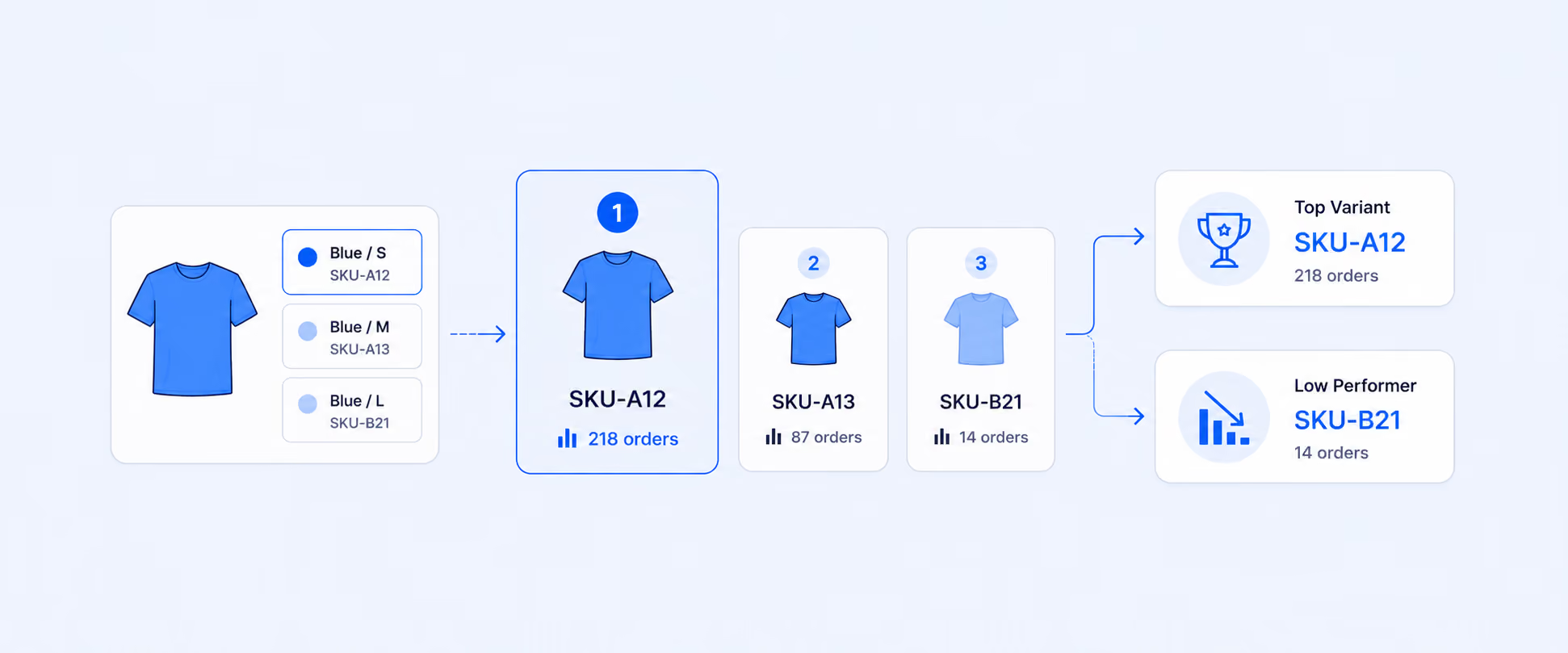
A hoodie may be one of your best sellers, but only the black medium and navy large variants may be driving most of the demand. A candle may sell well overall, while one scent sits on the shelf for months. If you only review product-level totals, those details stay hidden until stockouts, overbuying, or markdowns force the issue.
That is why product, variant, and SKU reporting matters. It helps merchants understand what customers are actually buying, which variants need replenishment, which options are slow movers, and where product-level sales are hiding inventory problems.
Product vs. Variant vs. SKU in Shopify
Product, variant, and SKU are related, but they are not the same thing.
A product is the main item you sell, such as a T-shirt, candle, sneaker, or skincare serum.
A variant is a specific option of that product, such as size, color, scent, finish, or material. Variant-level details can include images, prices, quantities, SKUs, barcodes, HS codes, country or region of origin, and inventory locations.
A SKU is the stock keeping unit used to identify a product or variant internally. SKUs are not required for every Shopify product, but they help with inventory tracking, reporting, fulfillment, returns, customer questions, and third-party integrations.
This distinction matters because product-level reporting can hide what is happening underneath. A product may be successful overall, while certain variants are creating dead stock, stockout risk, or fulfillment confusion.
Why SKU Level Performance Matters
SKU reporting gives merchants a cleaner view of demand.
At a product level, you might know that a sneaker sold 500 units last month. At a SKU level, you may discover that one size sold out twice, another size barely moved, and one color had a much higher return rate. That changes how you reorder, advertise, price, and merchandise the product.
SKU level tracking helps identify top-performing variants, slow-moving sizes or colors, stockout risk, overstock risk, fulfillment accuracy issues, and the exact product options customers prefer. The goal is not just to see what sold. It is to understand which version of the product created the sale.
Where Shopify Stores Product and SKU Data
Product and variant data lives in the Products area of the Shopify admin.
For individual products, merchants can review and edit product details, options, variants, prices, inventory quantities, SKUs, barcodes, and location-level availability. SKUs can also be edited in bulk or imported with a CSV file.
For larger catalogs, consistent SKU setup is important. Duplicate SKUs can create issues with inventory tracking and third-party integrations, and Shopify displays warnings when duplicate SKUs are detected. The same SKU can be used for the same product variant across multiple locations, while inventory is tracked separately by location.
That setup is the foundation for cleaner product and variant reporting.
Where to Find Product and Variant Reports in Shopify
The most relevant native path is:
Analytics > Reports > Category Filter > Sales
From there, merchants can use reports such as Total Sales by Product and Total Sales by Product Variant. The product variant report gives a more granular view than the product report and includes fields such as product title, variant title, variant SKU, and net quantity. Shipping is not included in product and product variant sales reports because a single order can contain multiple products, and shipping cannot be cleanly apportioned across each item.
Inventory reports are available from:
Analytics > Reports > Category Filter > Inventory
Inventory reports help track month-end inventory, inventory value, average units sold per day, percentage sold, ABC product analysis, sell-through rate, inventory remaining, and inventory adjustment activity. The Inventory Sold Daily by Product report includes product title, variant title, variant SKU, quantity sold, and quantity sold per day.
This gives merchants two different views: sales performance from Sales reports and stock movement from Inventory reports.
The Product and Variant Metrics Worth Tracking
A strong SKU report should help merchants connect sales, inventory, and profitability. The right fields depend on the decision, but these are usually the most useful metrics.
This table is useful because product and SKU performance is not only a sales question. A high-selling SKU with low inventory is a replenishment issue. A low-selling SKU with high inventory value is a cash-flow issue. A high-return SKU may be a quality, sizing, or expectation problem.
How to Use Product and Variant SKU Reports
Start by separating product performance from variant performance.
A product-level view tells you which products are contributing the most sales. A variant-level view tells you which options inside those products are doing the work. The second view is often where the more useful inventory decisions happen.
For example, a fashion store may see that its linen shirt is a top-selling product. At variant level, the white medium and white large sizes may be selling quickly, while green small and beige extra small barely move. The product looks healthy overall, but the next purchase order should not simply repeat the same size and color mix. It should lean into the variants that customers are actually buying.
The same logic applies to stock risk. If a variant has strong net quantity sold, strong sell-through, and low days of inventory remaining, it may need replenishment soon. If another variant has low sales, high ending inventory, and repeated discounts, it may need a bundle, markdown, or merchandising change.
Where Native Shopify Reporting Starts to Feel Limited
Native Shopify reports give merchants useful product and variant data, but they do not always combine the full decision view in one place.
A merchant may need variant-level sales, remaining inventory, product cost, margin, vendor, collection, tags, location, discounts, returns, and inventory value in one report. Another merchant may need to compare sales performance against stock risk across multiple locations. A merchandising team may need to see which sizes and colors are slow movers before placing the next buy.
That is where the workflow becomes harder. Sales reports answer sales questions. Inventory reports answer inventory questions. Product setup lives in the Products area. When the decision requires all three, merchants often end up exporting and combining data manually.
Report Pundit becomes useful when product and SKU reporting needs to become a repeatable workflow. Merchants can build reports that combine product, variant, SKU, inventory, sales, tags, metafields, collections, vendors, and other fields into a format their team can use. Report Pundit supports custom reports, advanced filters, calculated fields, multi-store reporting, Google Sheets integrations, and export options.
The value is not just seeing more columns. It is giving merchandising, inventory, finance, and operations teams one report that supports the decision they need to make.
A Worked Example: One Product, Three Very Different Variants
Imagine a Shopify store sells a running shoe in three color variants.
The black variant has strong sales, high sell-through, and only 10 days of inventory remaining. The red variant has moderate sales and enough stock for 45 days. The yellow variant has weak sales, heavy discounts, and high ending inventory.
At product level, the running shoe looks successful. At variant level, the story changes.
The black variant needs replenishment or inventory transfer before it stocks out. If supplier lead time is three weeks, the black variant is already at risk because the store has only 10 days of stock left. The red variant is stable and may only need normal monitoring. The yellow variant likely needs action before more cash is tied up, such as better placement, a bundle, a targeted promotion, or a smaller future buy.
That is the practical value of SKU reporting. It stops the team from treating one product as one decision when the variants clearly need different actions.
Practical Product and SKU Reports Merchants Often Need
Different teams need different product and SKU views, but the goal is the same: Turn product data into clearer action.
A merchandising team may need product and variant performance with discounts, returns, sell-through, and inventory value to decide what to reorder, promote, or retire. An inventory team may need low-stock SKUs by location to prevent stockouts before customers see unavailable options. A finance team may need SKU-level profitability to separate high-revenue products from truly profitable products. A fulfillment team may need SKUs, barcodes, product titles, variant titles, and location data to reduce picking mistakes.
These are not just different report layouts. They are different operating decisions that depend on clean product, variant, and SKU data.
Native Shopify Reports vs. Custom Product and SKU Reporting
Native Shopify reports are usually enough when the question is simple: which products or variants sold during a selected period, or what inventory remains by product variant?
Custom product and SKU reporting becomes more useful when the report needs to combine sales, inventory, product setup, tags, metafields, collections, locations, vendor data, cost, margin, returns, discounts, or scheduled delivery.
Use native reports when you need a quick product or variant check. Use a custom reporting workflow when product and SKU performance needs to guide buying, replenishment, pricing, merchandising, fulfillment, or finance decisions every week.
Common Mistakes to Avoid
Product-level totals can hide variant-level problems. A product may look like a best seller while one size, color, or option is carrying the sales and another is quietly turning into dead stock.
SKUs only help when they are set up consistently. Duplicate SKUs, missing SKUs, or SKUs added after orders were placed can weaken reporting, search, fulfillment, and integrations. Sales and analytics work better when products have unique identifiers, especially for large catalogs and connected systems.
Shipping should not be expected inside product or product variant sales reports. Shipping is excluded from those reports because a single order can include several products but only one shipping charge. For reporting purposes, that shipping charge cannot be accurately split across products.
Variant performance needs inventory context. A variant with strong sales and low stock is not just a best seller. It may be a stockout risk. A variant with low sales and high inventory value may need a purchasing or markdown decision.
Changed product details can affect how reports appear. Sales reports use the original values from the time of the order, and changes to product fields between orders can cause multiple rows for the same product if the identifying information is not exactly the same.
Conclusion
Shopify gives merchants useful product, variant, SKU, sales, and inventory data. The challenge is bringing those details together in a way that supports real decisions.
Product-level reporting shows what sells overall. Variant and SKU reporting shows which exact options customers want, which variants are sitting too long, and which SKUs may run out soon. That difference matters for purchasing, merchandising, fulfillment, and cash flow.
Report Pundit becomes useful when product and SKU reporting needs to move beyond separate native views and become one repeatable workflow for the teams that manage inventory, sales, and product performance every day
FAQ's
What Is a Shopify SKU?
A SKU is a stock keeping unit used to identify a product or product variant. SKUs are used internally to track inventory and report on sales. They also support fulfillment, exchanges, returns, customer questions, and third-party integrations.
What Is the Difference Between a Product, Variant, and SKU?
A product is the main item being sold. A variant is one option of that product, such as a size, color, scent, or finish. A SKU is the internal code used to identify and track a specific product or variant.
Where Can I Find Shopify Sales by Product Variant?
Go to Analytics > Reports > Category Filter > Sales, then open Total Sales by Product Variant. This report provides a more granular sales view than Total Sales by Product and includes product title, variant title, variant SKU, and net quantity.
Can Shopify Show Variant SKU in Reports?
Yes. The Total Sales by Product Variant report includes variant SKU as an additional term, along with product title, variant title, and net quantity. Inventory reports such as Inventory Sold Daily by Product also include variant SKU.
Why Do Product Reports Not Include Shipping?
Shipping is excluded from product and product variant sales reports because a single order can include several products but only one shipping charge. That shipping amount cannot be accurately assigned to each individual product.
When Should I Use Report Pundit for Product and SKU Reports?
Report Pundit is useful when product and SKU reporting needs custom fields, tags, metafields, collections, vendor data, inventory, sales, margin, multi-store views, or scheduled delivery in one workflow. It is especially helpful when teams need the same report repeatedly without rebuilding spreadsheets manually.

5.0 ( 2000+ Reviews)
