Shopify Cohort Analysis: Track Retention and Customer Value

Shopify Cohort Analysis: How to Track Customer Retention and Long-Term Value
Most Shopify stores know how many orders they got last month. Fewer know whether the customers acquired last month were actually any good.
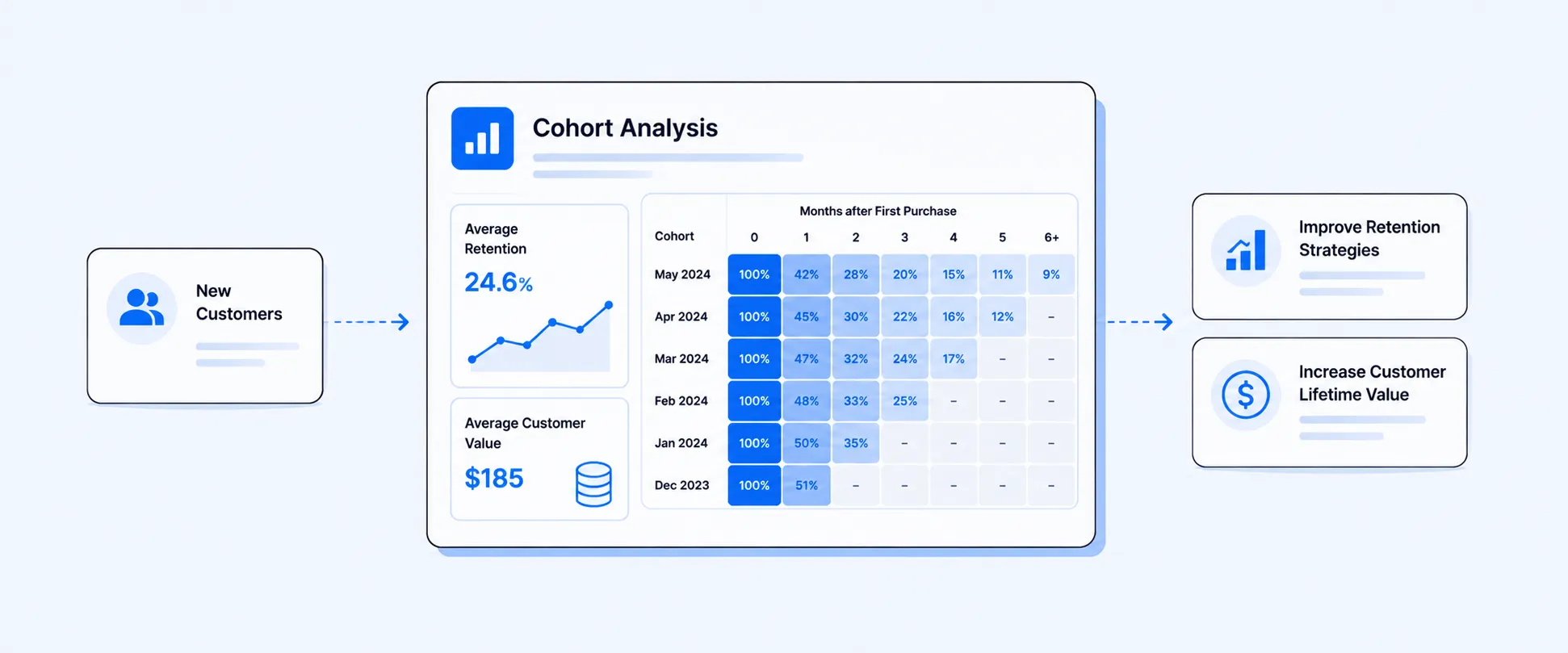
That is the real job of cohort analysis. Instead of treating all customers as one blended group, it tracks how a specific group behaves over time after a shared starting point. In Shopify, that starting point is usually the customer’s first order date, which is how Shopify’s native Customer cohort analysis report defines default cohorts.
This matters because growth without retention is expensive. A campaign can look strong on first-order revenue and still bring in customers who never come back. A weaker-looking acquisition month can turn out to be far more valuable if those customers repurchase, spend more over time, and stay engaged longer. Shopify’s cohort report is built to show exactly that kind of pattern.
What a cohort means in Shopify reporting
A cohort is a group of customers who share the same starting point within a defined period.
In Shopify’s native cohort analysis, the default grouping is based on when customers placed their first order. So:
- Customers who first bought in January form one cohort
- Customers who first bought in February form another
- Customers who first bought in Q2 form another, if you are grouping by quarter
Shopify’s customer cohort report then tracks how those groups behave across later periods, such as repeat purchases, spending, and retention.
That is what makes cohort analysis different from a normal customer report. It is not just showing totals. It is showing how customer quality holds up over time.
Why cohort analysis is so useful for Shopify merchants
A blended customer view hides important differences.
Imagine two months with the same number of new customers. On the surface, both months look equally strong. But cohort analysis may reveal that one month brought in customers who returned quickly and spent more, while the other brought in one-time discount shoppers who never came back.
That is why cohort analysis is one of the clearest ways to evaluate:
- Retention quality
- Acquisition quality
- Repeat purchase behavior
- Long-term customer value
- How campaigns or product entry points shape future performance
It helps merchants see which customers come back, which acquisition periods produce stronger repeat buyers, and where long-term customer value is improving or weakening.
The most common cohort type: first-purchase cohorts
The standard cohort model in Shopify is based on the customer’s first purchase.
That means each row in the cohort report represents customers who began their relationship with your store in the same period. Shopify’s report then tracks what happens to them in Month 0, Month 1, Month 2, and so on, depending on the interval you choose. A customer stays in the cohort tied to their first purchase period, even as their repeat orders and spend show up in later periods.
This is the most useful cohort model for most ecommerce teams because it matches the real business question:
What happened to the customers we acquired during that period?
Weekly, monthly, or quarterly cohorts: which interval should you use?
Shopify lets merchants choose the interval used to group cohorts. The best interval depends on order volume and how much detail you need. Cohorts can be grouped weekly, monthly, or quarterly depending on how much volume the store has and how detailed the analysis needs to be.
Weekly cohorts
Best for high-volume stores that want tight feedback loops on acquisition and repeat behavior.
Monthly cohorts
Usually the most practical option for most Shopify stores because it balances readability and trend clarity.
Quarterly cohorts
Useful when order volume is lower or when the business wants a broader strategic view instead of fine-grained movement.
The right choice is less about theory and more about signal quality. If the cohort is too small, the pattern gets noisy. If it is too broad, you can miss important differences.
You can refine cohorts far beyond “first order month”
This is one of the most useful parts of Shopify’s cohort analysis.
One of the most useful parts of cohort analysis is that it does not have to stay generic. You can narrow cohorts using conditions tied to the customer’s first order, which makes it easier to compare groups based on how they entered the business.
That means you can analyze questions like:
- Customers whose first order came from the online store
- Customers acquired through POS
- Customers tied to a specific channel or source
- Customers whose first order included a certain product or collection
- Customers from a specific country or region
- Customers with a certain email-marketing status
This is where cohorts become much more strategic. You are no longer asking “Are customers coming back?” You are asking which kinds of customers come back, and under what conditions?
What metrics can you analyze in Shopify cohort reports?
Cohort reports are not limited to one retention metric. They can be used to study customer value and repeat behavior from several angles, which makes them far more useful than a simple repeat-purchase count.
The most useful cohort metrics usually include:
- Number of customers in the cohort
- Repeat purchase behavior
- Customer retention rate
- Net sales by cohort
- Amount spent per customer
- Average order value, depending on your reporting setup
Shopify also supports projections for amount spent per customer in the cohort report, which can help merchants estimate likely future value at the cohort level.
That makes cohort analysis valuable not just for retention, but also for forecasting future customer value.
Where to find cohort analysis in Shopify
Shopify’s native cohort analysis lives in the customer reports area.
You can find it under:
Analytics → Reports → Customer cohort analysis
The report is built around customer acquisition and retention behavior and includes multiple ways to view performance over time, including a heatmap-style cohort grid, a retention curve, and a detailed cohort table.
The report includes:
- A heatmap-style cohort grid by default
- Retention curve visualization option
- Cohort analysis table
- Cohort analysis details
If you need more flexibility, Shopify also supports deeper report customization through explorations and custom reporting workflows.
What Shopify cohort analysis does well
Shopify’s native cohort report is strong at showing:
- Customer retention over time
- Repeat purchase patterns
- Cumulative customer spend by cohort
- Cohort comparisons by time period
- Filtered cohort views based on first-order conditions
It is especially useful for answering:
- Which acquisition periods brought in stronger customers
- Whether retention is improving or declining
- Whether certain channels or first-order conditions create better long-term buyers
- How quickly cohorts lose momentum after acquisition
For many stores, this is already enough to improve retention strategy.
Where Shopify’s native cohort analysis is limited
Shopify’s native cohort report is centered on customer acquisition and retention behavior. That is useful, but it also defines the limits of the report.
In practice, merchants often want custom cohort analysis that goes beyond the default customer-lifecycle lens. For example:
- Cohorts by first product purchased
- Cohorts by collection entry point
- Subscription vs one-time buyer cohorts in a custom layout
- Cohort analysis tied to specific marketing structures or custom dimensions
- Profitability or gross margin by cohort, not just retention and spend
- More tailored exports for finance, growth, or lifecycle teams
Shopify’s native report can be customized, but it still begins from the customer cohort framework. That is where a dedicated reporting layer becomes more useful, especially when the business wants a more customized cohort model or a more operational view of cohort performance.
A simple example of how cohort analysis changes decisions
Imagine two monthly cohorts:
- January cohort: 1,000 first-time customers
- February cohort: 1,000 first-time customers
On acquisition volume, they look identical.
But after three months:
- January customers are still buying again
- February customers mostly disappeared after the first order
Without cohort analysis, both months might look equally strong on top-line acquisition. With cohort analysis, you can see that one month produced more durable customer value than the other.
That can completely change how you evaluate:
- Campaign quality
- Discount strategy
- Landing page quality
- First-purchase product mix
- Retention timing and re-engagement
How Report Pundit helps with custom cohort reporting
This is where Report Pundit becomes especially useful.
Shopify’s native cohort report is good for customer acquisition and retention analysis. But merchants often want custom cohort logic, different cuts of the data, or more flexibility in how the results are grouped, exported, and shared.
With Report Pundit, you can build more tailored cohort-style reports around:
- First-purchase date
- Customer location
- Sales channel
- Product or collection entry point
- Subscription vs one-time purchase behavior
- Cohort sales and spend performance over time
- Scheduled exports for retention, marketing, finance, or lifecycle teams
That helps merchants move beyond one default cohort view and into reporting that matches the way their business actually thinks about customer quality.
What to watch when reading cohort reports
Cohort reports are powerful, but they are easy to misread if the team does not slow down.
A few things matter:
Do not compare cohorts too early.
A newer cohort has had less time to generate repeat behavior than an older one.
Look beyond customer count.
A larger cohort is not always a better cohort.
Separate acquisition success from retention success.
A campaign can be strong at getting first orders and weak at creating repeat customers.
Use the right interval.
Weekly cohorts can be too noisy for low-volume stores. Quarterly cohorts can be too broad for fast-moving stores.
Pair revenue with retention.
A cohort that repurchases is useful. A cohort that repurchases and spends well is better.
FAQ
What is a cohort in Shopify analytics?
A cohort is a group of customers who share the same starting point within a defined time period. In Shopify’s default customer cohort analysis, cohorts are grouped by the date of the customer’s first order.
Where can I find cohort analysis in Shopify?
You can find it in Analytics → Reports → Customer cohort analysis. Shopify documents it as part of the default customer reports.
What does Shopify’s cohort report measure?
It measures customer acquisition and retention patterns over time. Merchants can customize metrics and filters in the report, and analyze repeat purchase behavior, customer retention, and spending by cohort.
Can I filter Shopify cohorts by channel or first-order conditions?
Yes. Shopify’s cohort definition and report filters let merchants narrow the cohort based on first-order criteria, such as sales channel.
Can Shopify project future cohort value?
Yes. Shopify supports projections for amount spent per customer in the customer cohort analysis report.
When do I need a custom cohort report?
You usually need one when the default Shopify customer cohort view is not enough, such as when you want custom cohort groupings, product-entry cohorts, subscription-vs-one-time cohorts, or more tailored exports for internal teams.
Closing
Cohort analysis helps you stop asking only how many customers you acquired and start asking whether those customers were actually worth acquiring.
That is what makes it one of the most useful reporting views in Shopify. It turns retention, repeat purchase behavior, and long-term value into something visible.
Shopify gives merchants a strong native starting point with customer cohort analysis. And when the business needs more customized cohort logic, more filters, or more flexible reporting, Report Pundit gives teams a practical way to build cohort reporting around the questions they actually need answered.

5.0 ( 2000+ Reviews)
