Gross Profit vs Net Profit in Shopify Reporting

What Is the Difference Between Gross Profit & Margin and Net Profit & Margin in Shopify Reporting?
Revenue can look strong in Shopify and still hide a weak business underneath.
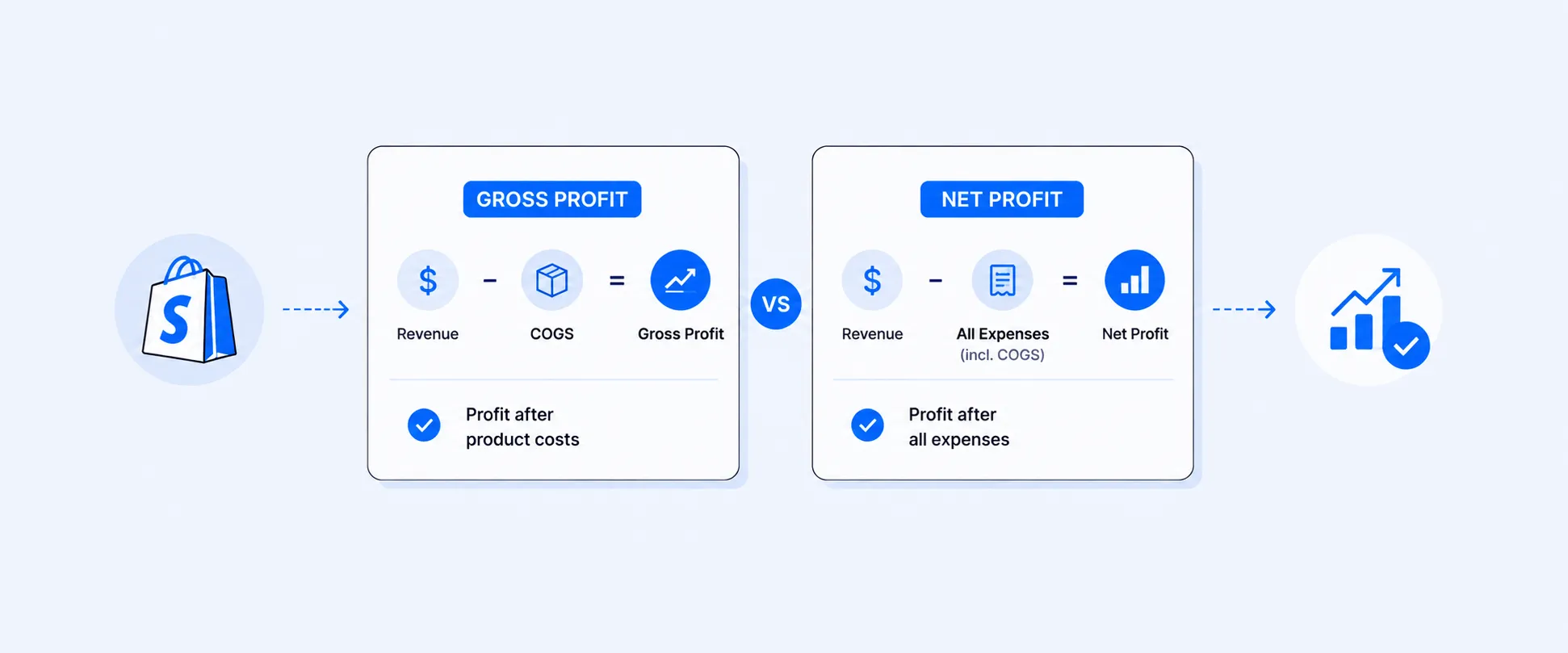
That usually happens when merchants track sales closely but mix up two very different profitability metrics: Gross profit and net profit. Gross profit tells you what’s left after product costs (COGS). Net profit tells you what’s left after all costs. Margins tell you efficiency as a percentage.
That difference matters in Shopify reporting. Shopify does provide native profit reports and finance reporting, but those reports are built around gross profit and gross margin, which depend on your product costs being recorded in Shopify. They do not automatically turn your store into a full net-profit system that includes ad spend, app costs, Shopify subscription fees, or all other operating expenses.
If you use the wrong metric for the wrong decision, pricing, advertising, inventory planning, and growth targets can all drift in the wrong direction.
The short version
Gross profit is the dollar amount left after COGS only is removed from net sales.
Gross margin is the percentage of net sales left after COGS only.
Net profit is the dollar amount left after all costs are removed from revenue.
Net profit margin is the percentage of revenue left after all costs.
If your store makes $50,000 in revenue and keeps $10,000 after all costs, then:
- Net profit = $10,000
- Net profit margin = 20%
Net sales $50,000, COGS $20,000
- Gross profit = $30,000
Gross margin = 60%
Same business, two different lenses.
Profit tells you the dollars left over. Margin tells you how efficiently revenue turns into profit.. Shopify’s own margin guidance makes the same distinction: gross margin focuses on sales left after cost of goods sold, while net margin takes all operating expenses into account.
Gross profit and Gross Margin are not interchangeable
This is where many Shopify merchants get tripped up.
A store can have high revenue and still produce a weak profit margin. Another store can have lower revenue but keep a much healthier share of every dollar earned. If you only watch net profit, you can miss efficiency problems. If you only watch margin, you can miss the actual cash the business is generating.
That is why strong operators usually track both together:
- Gross profit: product-level dollars after COGS
- Gross margin: product-level efficiency after COGS
- Net profit: business-level dollars after all costs
- Net profit margin: business-level efficiency after all costs
Net profit: the dollar amount your store actually keeps
Net profit is the amount of money left after every meaningful cost has been subtracted from revenue.
Net profit formula
Net Profit = Revenue − COGS − Operating Expenses - other expense (Ads spent, bills) − Taxes
In a Shopify business, that often means subtracting:
- Cost of goods sold
- Shipping costs you absorb
- Returns and refunds
- Payment processing fees
- Advertising spend
- App costs
- Payroll or contractor costs
- Taxes and overhead
Shopify’s native finance and profit reporting can help with part of that picture, especially around gross profit and sales-related costs that exist in Shopify data. But native profit reports are still centered on gross profit logic tied to recorded product cost, not full store net profit by default.
Example
Let’s say your store has this monthly picture:
In this case, your store kept $17,500 after costs. That is your net profit.
Net Profit margin: the percentage that tells you how efficient you are
Net Profit margin is not a dollar figure. It is a percentage.
It tells you what share of revenue survives as profit after costs. Shopify’s net margin guidance defines net profit margin as net income divided by revenue, multiplied by 100.
Net profit margin formula
Net Profit Margin (%) = (Net Profit ÷ Revenue) × 100
Using the same example above:
- Net profit = $17,500
- Revenue = $50,000
Net Profit Margin = 35%
That means your business keeps $0.35 from every $1.00 in revenue.
This is why margin is such a useful management metric. It lets you compare performance across products, months, stores, channels, or campaigns even when revenue levels are very different.
Gross profit margin vs Net profit margin: the comparison merchants actually need
That distinction matters because Shopify’s native profit reports are built around gross profit and gross margin, not complete net profit. Shopify’s analytics field reference defines:
- Gross profit = net sales − cost of goods sold
- Gross margin = gross profit ÷ net sales
So when a merchant says, “I want profit margin in Shopify,” the first follow-up question is:
Do you mean gross profit margin or net profit margin?
Here is the cleanest way to separate them:
A simple example that shows why both metrics matter
Consider two stores:
Store A looks larger on revenue.
Store B looks healthier on efficiency and keeps more actual profit.
That is exactly why revenue alone is not enough, and why net profit alone is not enough either. Margin tells a different story from size.
What Shopify shows natively, and what it does not
Shopify’s current reporting stack is stronger than many merchants think. Shopify Analytics includes profit reports, finance reports, and customizable reports through the Reports area in admin. Shopify’s current plan documentation also shows that reports, including profit reports and custom reports, are now available across plans like Basic and Advanced, though report access and analytics depth can still vary by subscription plan overall.
What Shopify can show well
Shopify can natively show:
- Gross profit
- Gross margin
- Net sales
- Cost of goods sold, if cost per item is recorded
- Finance summary views with gross profit breakdowns
What Shopify does not automatically solve
Shopify does not automatically combine all of the following into one native net-profit view:
- Ad spend
- App costs
- Payroll or contractor costs
- All operating overhead
- Every external platform cost you want included in profitability
That is why merchants often feel they can see margin but still cannot see “true profit” in a way that is ready for decision-making.
Why cost setup inside Shopify matters so much
Shopify’s profit reports depend on cost per item being set correctly. Shopify explicitly notes that if your product has variants, each variant needs its own cost entered for profit reports to work accurately.
That means two merchants can open the same profit report and get very different quality of output:
- One gets a usable gross profit view
- The other gets partial data because COGS is missing or incomplete
So even before you get to net profit, the quality of your margin reporting depends heavily on clean cost data.
When merchants should use gross profit margin
Gross profit margin is usually the right metric when the question is about product economics.
Use it when you want to know:
- Which products are priced well
- Which collections have weak margins
- Whether discounts are hurting product-level profitability
- Whether a sales channel is selling high-volume but low-margin products
This is where Shopify’s native profit reports are most helpful, because gross margin is already part of Shopify’s reporting logic when cost is set up properly.
When merchants should use net profit
Net profit is the better metric when the question is about the business as a whole.
Use it when you want to know:
- How much money the store actually kept
- Whether the month was financially healthy
- Whether paid acquisition is still worth scaling
- Whether overhead is eating into performance
- Whether your current growth is truly sustainable
Gross margin can look healthy while net profit is weak if ads, shipping, returns, and software costs are too high. That is why net profit is often the more important “reality check” metric.
How Report Pundit helps close the gap
If you want profitability views beyond Shopify’s gross margin reports, you usually need a reporting layer that can bring costs and segments together.
Shopify’s native reports are good at gross profit and gross margin when your cost data is set up properly. But merchants often need more than that. They want to see profit metrics by product, variant, collection, location, POS location, channel, or date range. They also want to bring in more cost context and automate those reports instead of rebuilding them manually every month.
With Report Pundit, you can build reports that surface gross profit, gross profit margin, and broader profitability views in a format that is easier to use across finance, ops, and merchandising. That includes use cases like:
- Daily profit views by POS location
- Online vs in-store splits
- Monthly gross profit margin tracking
- Profit reporting by product, variant, collection, or channel
- Scheduled profitability reports sent automatically to your team
That makes it much easier to answer real merchant questions like:
- “Can I get daily sales per POS location with gross and net profit, discounts, returns, and taxes?”
- “Can I create a monthly report showing gross profit margin?”
The safest way to think about these metrics
If you remember only one thing, remember this:
Gross profit tells you how much money you made.
Net Profit tells you how efficiently you made it.
And in Shopify, there is one more layer:
Gross profit & margin is native and product-cost driven.
Net profit & margin usually requires a more complete cost picture than Shopify provides by default.
That is why merchants who care about real profitability usually need both:
- Gross profit for pricing and merchandising decisions
- Net profit for business health and planning
FAQ
What is the difference between gross profit and net profit in Shopify?
Net profit is the dollar amount left after all costs are removed from revenue. Gross profit is the revenue that remains as profit after shopify product cost. In Shopify reporting, merchants often also need to distinguish gross profit from net profit, because Shopify’s native profit reports focus on gross profit and gross margin tied to cost of goods sold.
Does Shopify show net profit natively?
Not as a complete business-wide net-profit view by default. Shopify’s native profit reports are built around gross profit and gross margin, which depend on cost per item being recorded in Shopify.
How does Shopify calculate gross margin?
Shopify defines gross margin as gross profit ÷ net sales, and gross profit as net sales − cost of goods sold.
Why is my Shopify profit report inaccurate?
A common reason is missing or incomplete cost per item data. Shopify notes that if products have variants, each variant needs its own recorded cost for profit reporting to be accurate.
Should I track gross profit margin or net profit margin?
You should usually track both. Gross profit margin helps with product and pricing decisions. Net profit margin helps you understand how efficient the whole business is after all costs.
Can Report Pundit help me report gross metrics and net metrics by month or location?
Yes. Report Pundit is well suited for custom profitability reporting, including monthly margin views, POS location reporting, channel splits, and scheduled reports that surface profit-related metrics in a more decision-ready format.
Closing
A store can post impressive revenue and still be financially fragile.
That is why understanding the difference between Gross profit & and Net profit & margin matters so much in Shopify reporting. One tells you the dollars left over. The other tells you whether the model is efficient enough to last.
Shopify gives merchants a solid starting point with native gross profit and gross margin reporting. But if you want a fuller profitability view across products, channels, locations, and time periods, Report Pundit gives you a more practical way to track the numbers that actually drive decisions.

5.0 ( 2000+ Reviews)
