


What is Report Pundit MCP?
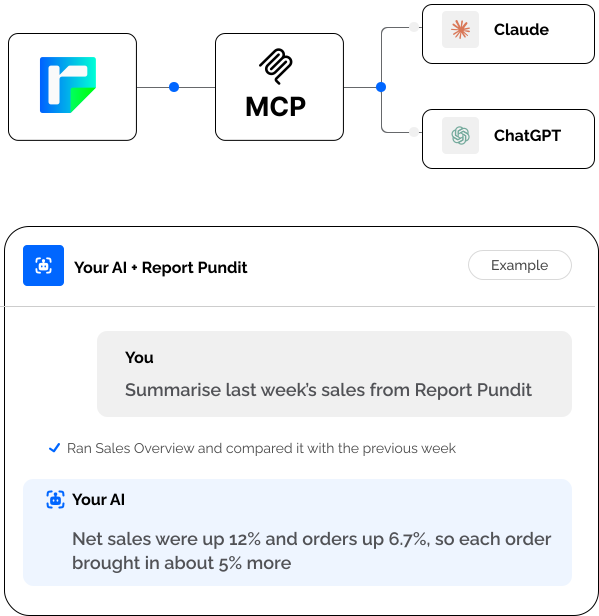
MCP is a way for an AI assistant to use another app directly. Report Pundit MCP lets Claude or ChatGPT run your Shopify reports itself, so you don't have to export a file and paste it in.
Ask
“Which discount codes cost me the most?”
Run
Report Pundit finds and runs your report.
Explore
The results come back to the chat, ready for follow-up questions.
YOUR REPORTS, IN THE CONVERSATION
What is Report Pundit MCP?
A direct connection between the reports you trust and the AI assistant you use.
MCP lets Claude or ChatGPT use Report Pundit directly. Ask a question, let your assistant run the report, and explore the results together.
“Which products sold best?”
Your saved sales report
An answer from your data
Less exporting. More answers.
Keep the reporting you rely on. Change how you explore it.
See how to connect →Skip the export routine
Go from a question to your report results without downloading, sorting, or pasting a CSV.
Work with your own numbers
Your assistant runs your Report Pundit reports and uses the returned rows to answer.
Keep the questions coming
Compare periods, ask for another breakdown, or change the date range. Your saved report stays the same.
Ask in plain language
Choose a question. See how the conversation can begin.
What reports do I have saved in Report Pundit?
Report Pundit · Saved reports
You have Sales by Product, Inventory on Hand, and Payout Summary saved. Which report would you like to run?
“Run Sales by Product for last month.”
Run my Inventory on Hand report. Which products need attention first?
Report Pundit · Inventory on Hand
Linen Throw has 8 units available, about 3 days of stock. Canvas Tote has 12 units, about 4 days of stock. Review these products first.
“Break that down by location.”
Run my Payout Summary for September. How much remains after fees and refunds?
Report Pundit · Payout Summary
Your sample net payout is $17,900: $18,500 gross, less $420 in fees and $180 in refunds.
“Compare that with August.”
What reports do I have saved in Report Pundit?
Report Pundit · Saved reports
You have Sales by Product, Inventory on Hand, and Payout Summary saved. Which report would you like to run?
“Run Sales by Product for last month.”
Illustrative conversation and sample data. Your answers use your reports.
Copy your access URL
In Report Pundit, go to Settings → Account Details and copy your MCP Access URL.
Example URL. Use the private link from your account.
Connect Claude
Open Settings → Connectors. Add a custom connector, name it Report Pundit, and paste your MCP URL.
Start asking questions
Turn on Report Pundit in your Claude chat, ask for a report, and explore the results.
Try another question →Run my Sales by Product report for September. Which product led net sales?
Report Pundit · Sales by Product
Canvas Tote led with $8,420 in net sales, followed by Linen Throw at $6,180. Would you like a breakdown by variant?
Sample response. Real answers come from your report data.
Copy your access URL
In Report Pundit, go to Settings → Account Details and copy your MCP Access URL.
Example URL. Use the private link from your account.
Connect ChatGPT
Create an MCP app in ChatGPT. Name it Report Pundit, paste your MCP URL, choose No Auth, and connect.
Start asking questions
Enable Report Pundit in your ChatGPT chat, ask for a report, and approve the tool call when prompted.
Try another question →Run my Sales by Product report for September. Which product led net sales?
Report Pundit · Sales by Product
Canvas Tote led with $8,420 in net sales, followed by Linen Throw at $6,180. Would you like a breakdown by variant?
Sample response. Real answers come from your report data.
Copy your access URL
In Report Pundit, go to Settings → Account Details and copy your MCP Access URL.
https://…/mcp?token=••••••••CopyExample URL. Use the private link from your account.
Connect Claude
Open Settings → Connectors. Add a custom connector, name it Report Pundit, and paste your MCP URL.
Start asking questions
Turn on Report Pundit in your Claude chat, ask for a report, and explore the results.
Try another question →Run my Sales by Product report for September. Which product led net sales?
Report Pundit · Sales by Product
Canvas Tote led with $8,420 in net sales, followed by Linen Throw at $6,180. Would you like a breakdown by variant?
Sample response. Real answers come from your report data.
Custom connections depend on your assistant plan and workspace settings. Your administrator may need to enable access.
Built to be safe
More insight into your business. Your store stays in your hands.

READ-ONLY ACCESS
Insights without edits.
Run reports and explore the results. Your AI cannot edit Shopify orders, products, inventory, or customers.
PRIVATE CONNECTION
Your link. Your control.
Keep your MCP URL private. Regenerate it if it is shared by mistake, and the old link stops working.
A RELIABLE RECORD
Keep your source of truth.
Use AI to analyze and compare. For tax filings and payouts, your Report Pundit export remains the record.
YOUR STORE STAYS IN YOUR HANDS
Built to be safe
Explore your numbers with a connection designed for reading reports.
Answers, with your store untouched.
Run reports and explore the results. Your AI cannot edit Shopify orders, products, inventory, or customers.
Your link. Your control.
Keep your MCP URL private. Regenerate it if it is shared by mistake, and the old link stops working.
Keep your source of truth.
Use AI to analyze and compare. For tax filings and payouts, your Report Pundit export remains the record.
YOUR STORE STAYS IN YOUR HANDS
Built to be safe
A private connection for reading and exploring your reports.
Read only, by design
Your assistant can read and run reports. It cannot edit orders, products, inventory, or customers in Shopify.
Keep your URL private
Your MCP URL works like a password. If it is shared by mistake, regenerate it to stop the old link from working.
Your export stays the record
Use the conversation to analyze and compare. For tax filings and payouts, use your Report Pundit export as the record.
Frequently asked questions
It connects Report Pundit to an AI assistant, so you can run your Shopify reports and explore the results in a conversation, without exporting a file first.
Install Report Pundit, copy your MCP Access URL from Settings, then Account Details, and add it in Claude as a custom connector. The steps are above and take about two minutes. No code is needed.
Yes. In ChatGPT, create an MCP app, paste your Report Pundit MCP URL and choose No Auth. ChatGPT can then run your reports, as long as custom apps are available on your ChatGPT plan.
It is an MCP connection for your Shopify reports. Claude or ChatGPT can run your Report Pundit reports and read the results. It does not edit orders, products, inventory or customers.
Yes. Ask for a report in plain language, and Report Pundit runs it and sends the results to the chat. You can then ask follow-up questions without a file.
Report Pundit MCP is available on all paid Report Pundit plans, not the Free plan. On the Claude side it works on Free, Pro, Max, Team and Enterprise. Claude Free allows one custom connector.
Reports run on Report Pundit's servers. Very large report results may be cut short in the chat, so use a focused date range or your Report Pundit export when you need the complete record.
No. It reads and runs your Report Pundit reports. It cannot edit orders, products, inventory or customers.
Yes. Each store can have its own connection, or you can use one connection for all of them.
Use it to analyse and compare. For anything you file or pay against, use your Report Pundit export as the record.